mailApp Version 6.0

✨ Highlights
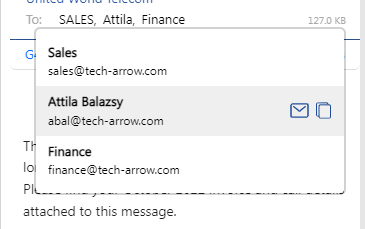
- New recipient popup displaying detailed user information, with quick actions such as sending an email or copying contact details.
- Support for Safari on macOS and Outlook for Mac, expanding browser compatibility for Mac users.
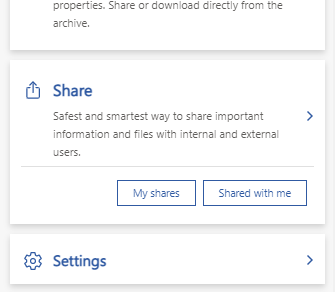
- New shortcuts on the startup page for faster access to files you have shared or that have been shared with you.
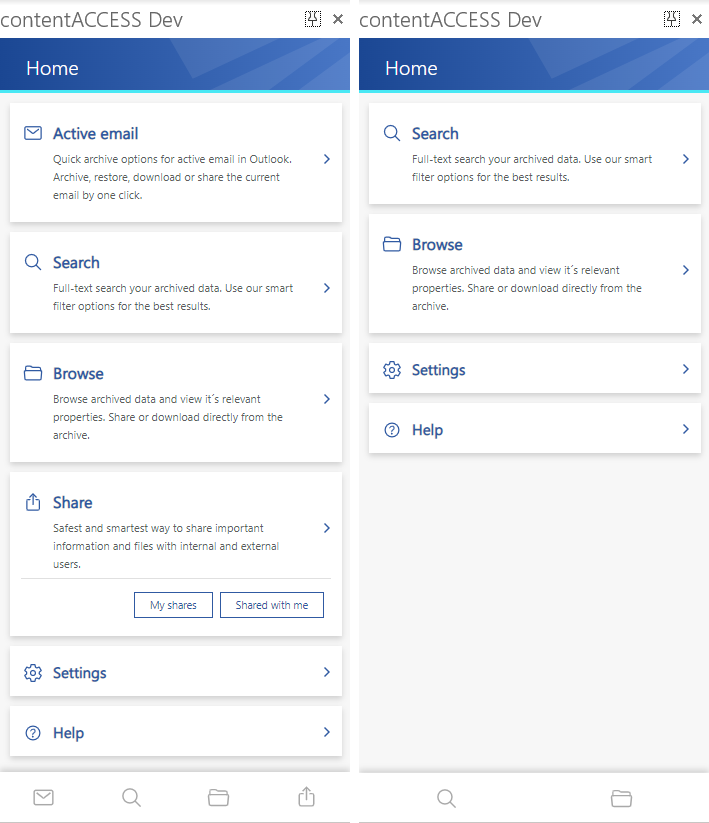
- Automatic hiding of features that are not accessible for certain archive types, improving usability across different archives.
- Performance and stability improvements for a smoother overall experience.
Common
✓ Recipient popup
By default, MailApp displays the first name of every recipient to give you as much information as possible in the most compact way. Now, when you click on the recipient list, a popup shows full user information with features such as sending an email to the recipient or copying the recipient’s name and email address.
✓ Safari support
We have good news for Mac users! MailApp is now running in the Safari browser and Outlook for Mac. We are still working hard to provide Mac users with the same user experience as Windows users. You can expect further improvements in upcoming releases, so stay tuned.
✓ Quick access to shares
Sharing is a very powerful feature in contentACCESS, and we are working to bring it closer to you. As an improvement, we have added two new shortcuts to the startup page that allow you to directly navigate to files you have shared or files that have been shared with you. This can save at least three to four extra clicks.
✓ Hide not accessible features
Previous versions of MailApp were designed for email archive users only. The new vNext version supports all other archives in contentACCESS, making it useful for users who only use the Teams Archive. In such cases, the Active Email button is hidden on the home screen and in the main menu. The same applies to sharing features.
✓ Performance and stability fixes
Improvements have been made to increase performance and stability, making your contentACCESS experience even better than before.