<?xml version="1.0" encoding="utf-8"?><?xml-stylesheet type="text/xsl" href="atom.xsl"?>
<feed xmlns="http://www.w3.org/2005/Atom">
    <id>https://docs.tech-arrow.com/release/camobile</id>
    <title>Tech-Arrow Documentation Blog</title>
    <updated>2023-04-11T00:00:00.000Z</updated>
    <generator>https://github.com/jpmonette/feed</generator>
    <link rel="alternate" href="https://docs.tech-arrow.com/release/camobile"/>
    <subtitle>Tech-Arrow Documentation Blog</subtitle>
    <icon>https://docs.tech-arrow.com/img/favicon.ico</icon>
    <entry>
        <title type="html"><![CDATA[contentACCESS Mobile Version 6.1]]></title>
        <id>https://docs.tech-arrow.com/release/camobile/camobile-6-1</id>
        <link href="https://docs.tech-arrow.com/release/camobile/camobile-6-1"/>
        <updated>2023-04-11T00:00:00.000Z</updated>
        <summary type="html"><![CDATA[✨ Highlights]]></summary>
        <content type="html"><![CDATA[<h2 class="anchor anchorTargetStickyNavbar_Vzrq" id="-highlights">✨ Highlights<a href="https://docs.tech-arrow.com/release/camobile/camobile-6-1#-highlights" class="hash-link" aria-label="Direct link to ✨ Highlights" title="Direct link to ✨ Highlights" translate="no">​</a></h2>
<ul>
<li class="">New optimized email preview for easier review of archived emails on mobile devices.</li>
<li class="">Improved shared item view with full access to details, downloads, and sharing settings.</li>
<li class="">Added Mobile Device Management (MDM) support for easier enterprise deployment and configuration.</li>
<li class="">Redesigned settings page with a clearer, more user-friendly layout.</li>
<li class="">Performance and stability improvements for a smoother overall experience.</li>
</ul>
<h2 class="anchor anchorTargetStickyNavbar_Vzrq" id="email-archive">Email archive<a href="https://docs.tech-arrow.com/release/camobile/camobile-6-1#email-archive" class="hash-link" aria-label="Direct link to Email archive" title="Direct link to Email archive" translate="no">​</a></h2>
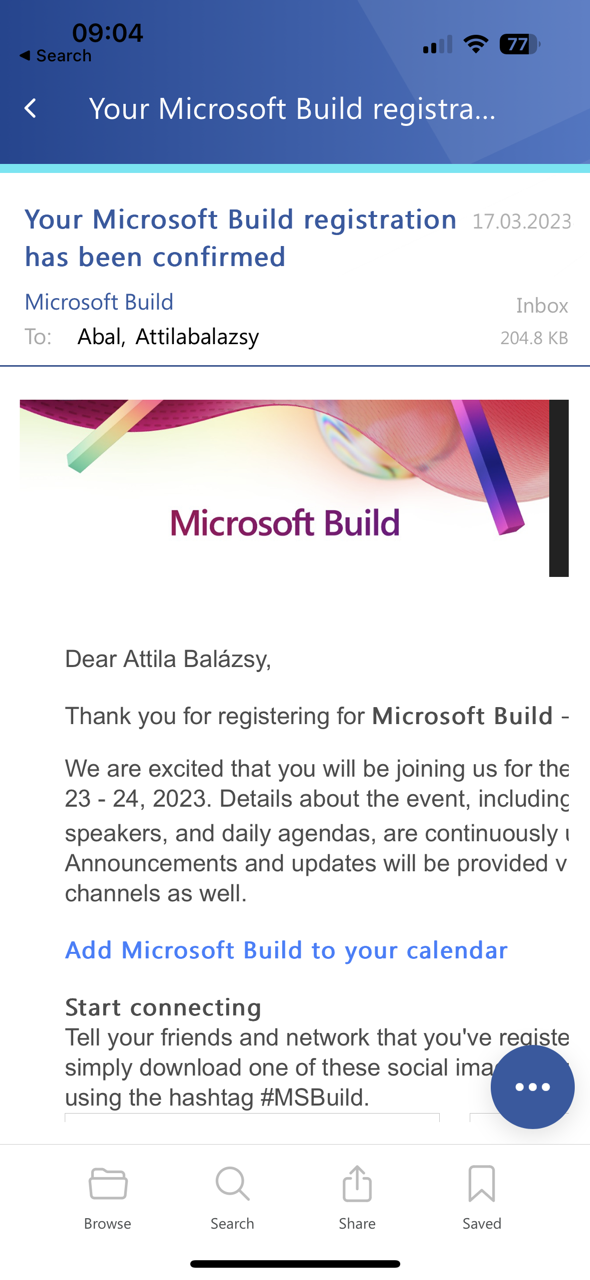
<p><strong>✓ New email preview</strong></p>
<p>In previous versions, there was a generalized view for all archive items, which was not optimal for emails. In mailApp vNext, we introduced an optimized view for emails that was well received by users. Now, the same preview is also available in contentACCESS Mobile. Just try it!</p>
<p><img decoding="async" loading="lazy" alt="Email preview" src="https://docs.tech-arrow.com/assets/images/camobile-6-1-email-preview01-7d8fa5557fb0cda855ba9564c87eed2a.png" width="590" height="1280" class="img_ev3q"></p>
<h2 class="anchor anchorTargetStickyNavbar_Vzrq" id="sharing">Sharing<a href="https://docs.tech-arrow.com/release/camobile/camobile-6-1#sharing" class="hash-link" aria-label="Direct link to Sharing" title="Direct link to Sharing" translate="no">​</a></h2>
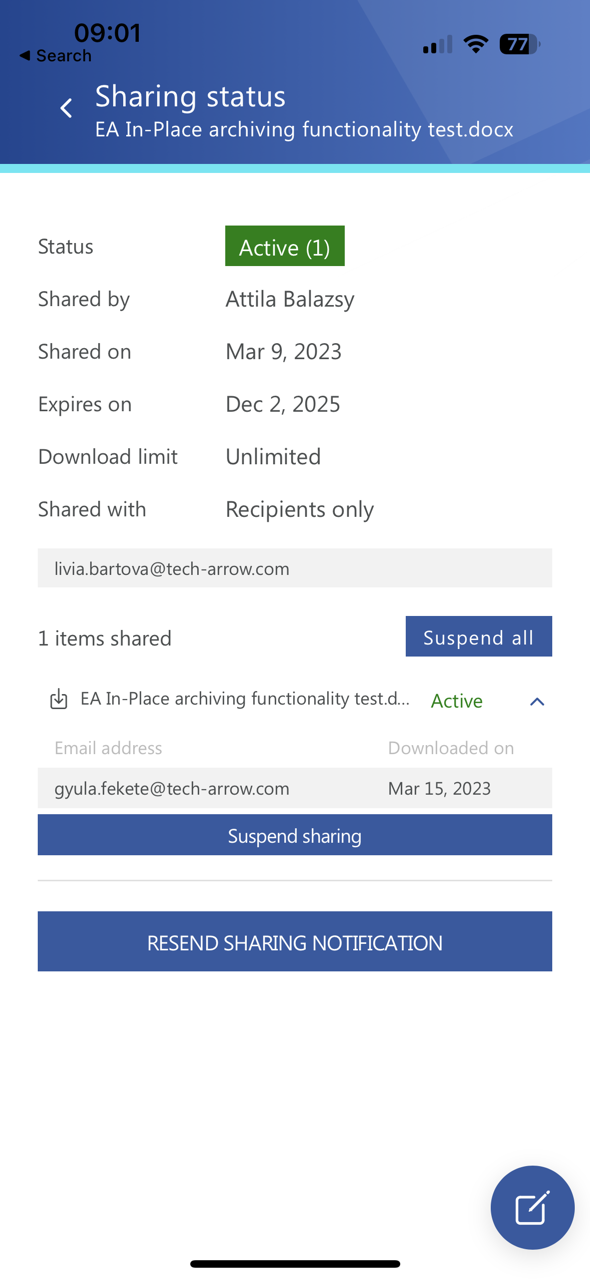
<p><strong>✓ Shared item view</strong></p>
<p>Previously, when you opened a shared item, the details view only provided rough sharing information. This has now been replaced with a new view that puts all details at your fingertips. In this view, you can see details and downloads, and also modify the settings. Managing your sharing has never been so easy!</p>
<p><img decoding="async" loading="lazy" alt="Sharing preview" src="https://docs.tech-arrow.com/assets/images/camobile-6-1-sharing-preview01-653439721c9c3a7bf069a36d582ba3c7.png" width="590" height="1280" class="img_ev3q"></p>
<h2 class="anchor anchorTargetStickyNavbar_Vzrq" id="common">Common<a href="https://docs.tech-arrow.com/release/camobile/camobile-6-1#common" class="hash-link" aria-label="Direct link to Common" title="Direct link to Common" translate="no">​</a></h2>
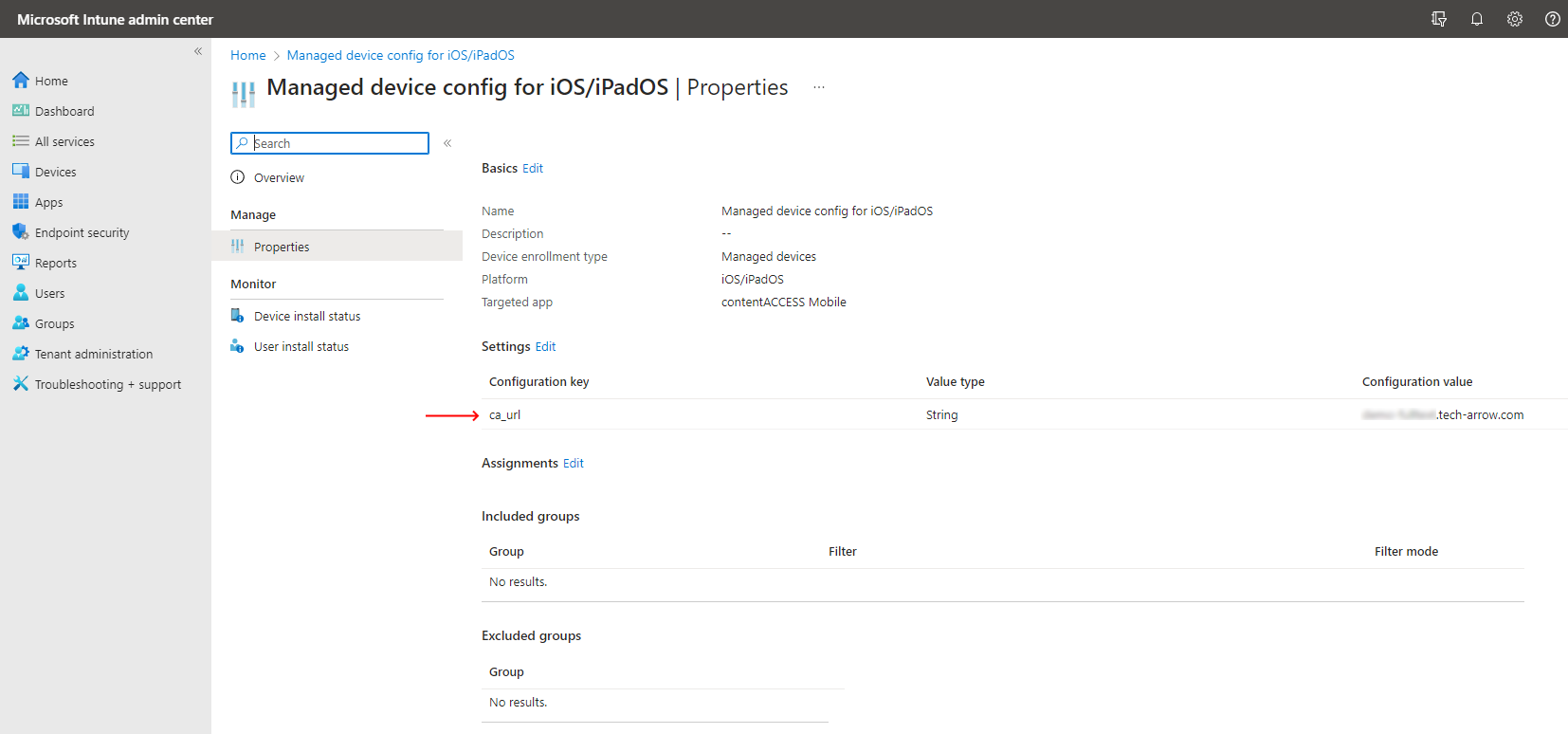
<p><strong>✓ MDM support</strong></p>
<p>contentACCESS Mobile is a great and handy application for users who are often on the road. However, deploying the app for enterprise needs used to be difficult—until now. In this version, we have implemented generic Mobile Device Management support. You can now deploy and configure the app through Intune, MobileIron, and many other MDM systems.</p>
<p><img decoding="async" loading="lazy" alt="Intune settings" src="https://docs.tech-arrow.com/assets/images/camobile-6-1-intune01-fcd99f42d9e750235934c7410bcf5f10.png" width="1654" height="774" class="img_ev3q"></p>
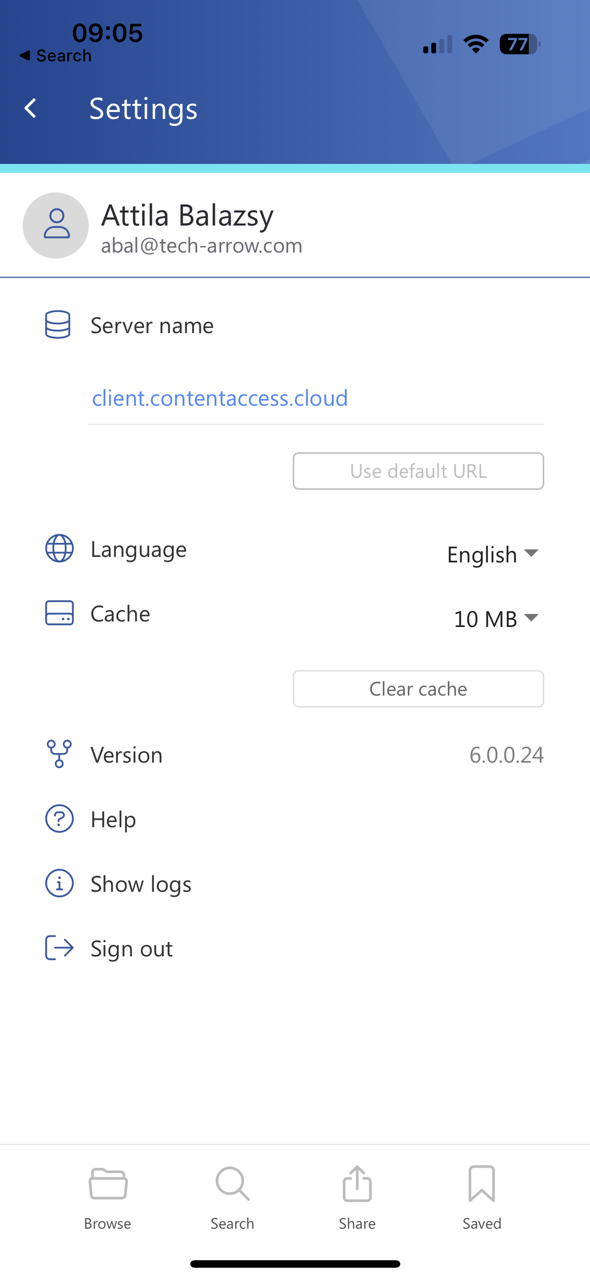
<p><strong>✓ Settings page redesign</strong></p>
<p>The settings page had not been touched for a very long time, even though the rest of the application had been redesigned. This has finally been updated as well. contentACCESS Mobile now has a brand-new settings page that is clearer and more user-friendly.</p>
<p><img decoding="async" loading="lazy" alt="Settings view" src="https://docs.tech-arrow.com/assets/images/camobile-6-1-setting01-e951988dded404daa339b32f437c0986.png" width="590" height="1280" class="img_ev3q"></p>
<p><strong>✓ Performance and stability fixes</strong></p>
<p>Improvements were made to make the system faster and more stable, so your contentACCESS Mobile experience is now even better than before.</p>]]></content>
        <author>
            <name>Attila Balázsy</name>
        </author>
        <category label="contentACCESS Mobile" term="contentACCESS Mobile"/>
        <category label="Release" term="Release"/>
    </entry>
    <entry>
        <title type="html"><![CDATA[contentACCESS Mobile Version 5.2]]></title>
        <id>https://docs.tech-arrow.com/release/camobile/camobile-5-2</id>
        <link href="https://docs.tech-arrow.com/release/camobile/camobile-5-2"/>
        <updated>2022-02-23T00:00:00.000Z</updated>
        <summary type="html"><![CDATA[✨ Highlights]]></summary>
        <content type="html"><![CDATA[<h2 class="anchor anchorTargetStickyNavbar_Vzrq" id="-highlights">✨ Highlights<a href="https://docs.tech-arrow.com/release/camobile/camobile-5-2#-highlights" class="hash-link" aria-label="Direct link to ✨ Highlights" title="Direct link to ✨ Highlights" translate="no">​</a></h2>
<ul>
<li class="">New download notification feature for contentACCESS Mobile when connected to contentACCESS 5.2 or higher.</li>
<li class="">Performance and stability improvements to enhance the overall contentACCESS Mobile experience.</li>
</ul>
<h2 class="anchor anchorTargetStickyNavbar_Vzrq" id="sharing">Sharing<a href="https://docs.tech-arrow.com/release/camobile/camobile-5-2#sharing" class="hash-link" aria-label="Direct link to Sharing" title="Direct link to Sharing" translate="no">​</a></h2>
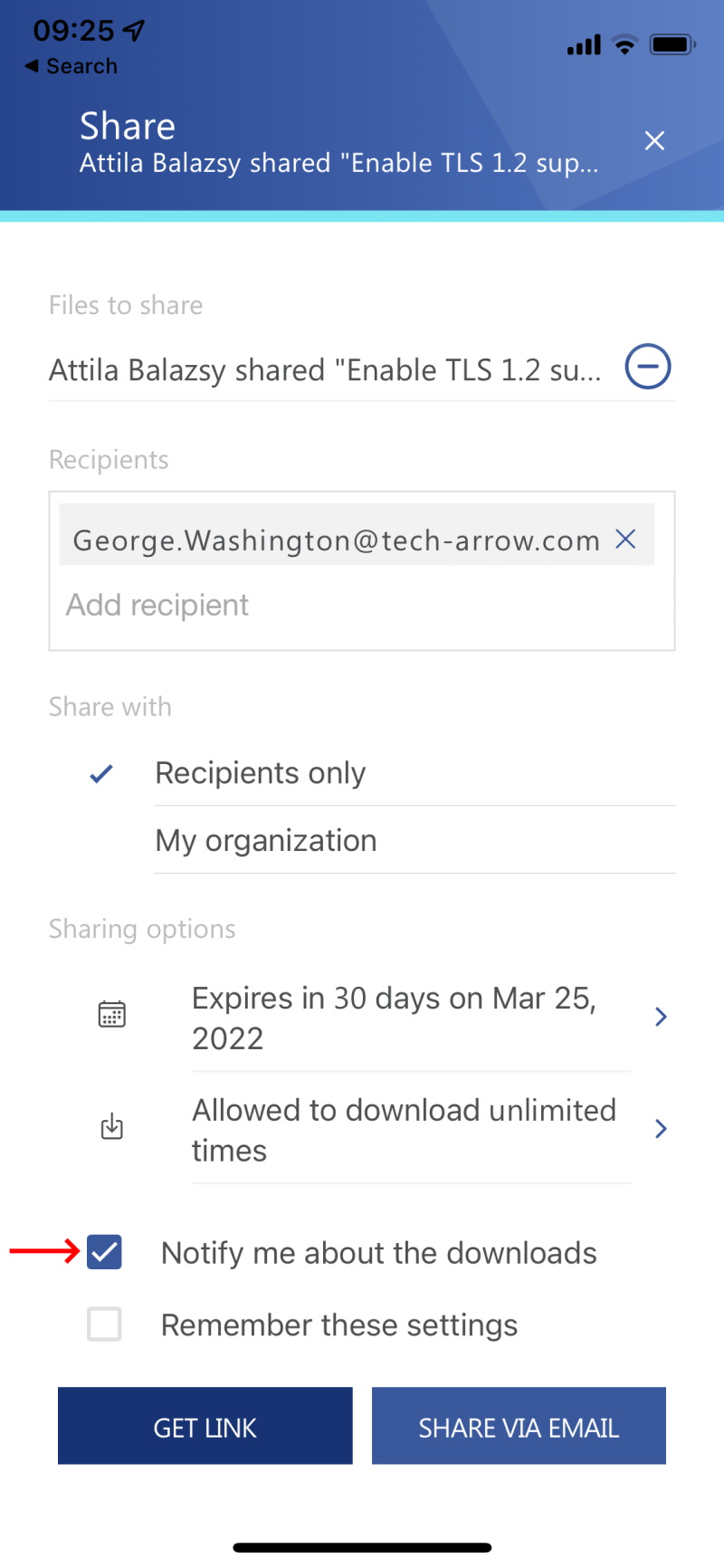
<p><strong>✓ Download notification</strong></p>
<p>The new download notification feature is also available in contentACCESS Mobile. To use this feature, contentACCESS Mobile needs to be connected to contentACCESS 5.2 or a higher instance.</p>
<p><img decoding="async" loading="lazy" alt="Download notification in contentACCESS Mobile" src="https://docs.tech-arrow.com/assets/images/eros-camob-notifyaboutdownload01-5211965cb2535748dfe11ee23fda1cfa.png" width="800" height="1732" class="img_ev3q"></p>
<h2 class="anchor anchorTargetStickyNavbar_Vzrq" id="common">Common<a href="https://docs.tech-arrow.com/release/camobile/camobile-5-2#common" class="hash-link" aria-label="Direct link to Common" title="Direct link to Common" translate="no">​</a></h2>
<p><strong>✓ Performance and stability fixes</strong></p>
<p>Improvements have been done to make the system faster and more stable, so the whole contentACCESS Mobile experience is now even better.</p>]]></content>
        <author>
            <name>Attila Balázsy</name>
        </author>
        <category label="contentACCESS Mobile" term="contentACCESS Mobile"/>
        <category label="Release" term="Release"/>
    </entry>
    <entry>
        <title type="html"><![CDATA[contentACCESS Mobile Version 5.1]]></title>
        <id>https://docs.tech-arrow.com/release/camobile/camobile-5-1</id>
        <link href="https://docs.tech-arrow.com/release/camobile/camobile-5-1"/>
        <updated>2021-08-13T00:00:00.000Z</updated>
        <summary type="html"><![CDATA[✨ Highlights]]></summary>
        <content type="html"><![CDATA[<h2 class="anchor anchorTargetStickyNavbar_Vzrq" id="-highlights">✨ Highlights<a href="https://docs.tech-arrow.com/release/camobile/camobile-5-1#-highlights" class="hash-link" aria-label="Direct link to ✨ Highlights" title="Direct link to ✨ Highlights" translate="no">​</a></h2>
<ul>
<li class="">Redesigned user interface with a fresh look and feel focused on simplicity, productivity, and faster one-handed access through floating and swipe menus.</li>
<li class="">Faster information discovery with search suggestions and hit highlighting across search results and item details.</li>
<li class="">New multi-selection support for saving and sharing multiple items directly from the mobile app.</li>
<li class="">Platform-level sharing now available on mobile, enabling secure sharing, auditing, and management of shared content.</li>
</ul>
<h2 class="anchor anchorTargetStickyNavbar_Vzrq" id="common">Common<a href="https://docs.tech-arrow.com/release/camobile/camobile-5-1#common" class="hash-link" aria-label="Direct link to Common" title="Direct link to Common" translate="no">​</a></h2>
<p><strong>✓ New look and feel</strong></p>
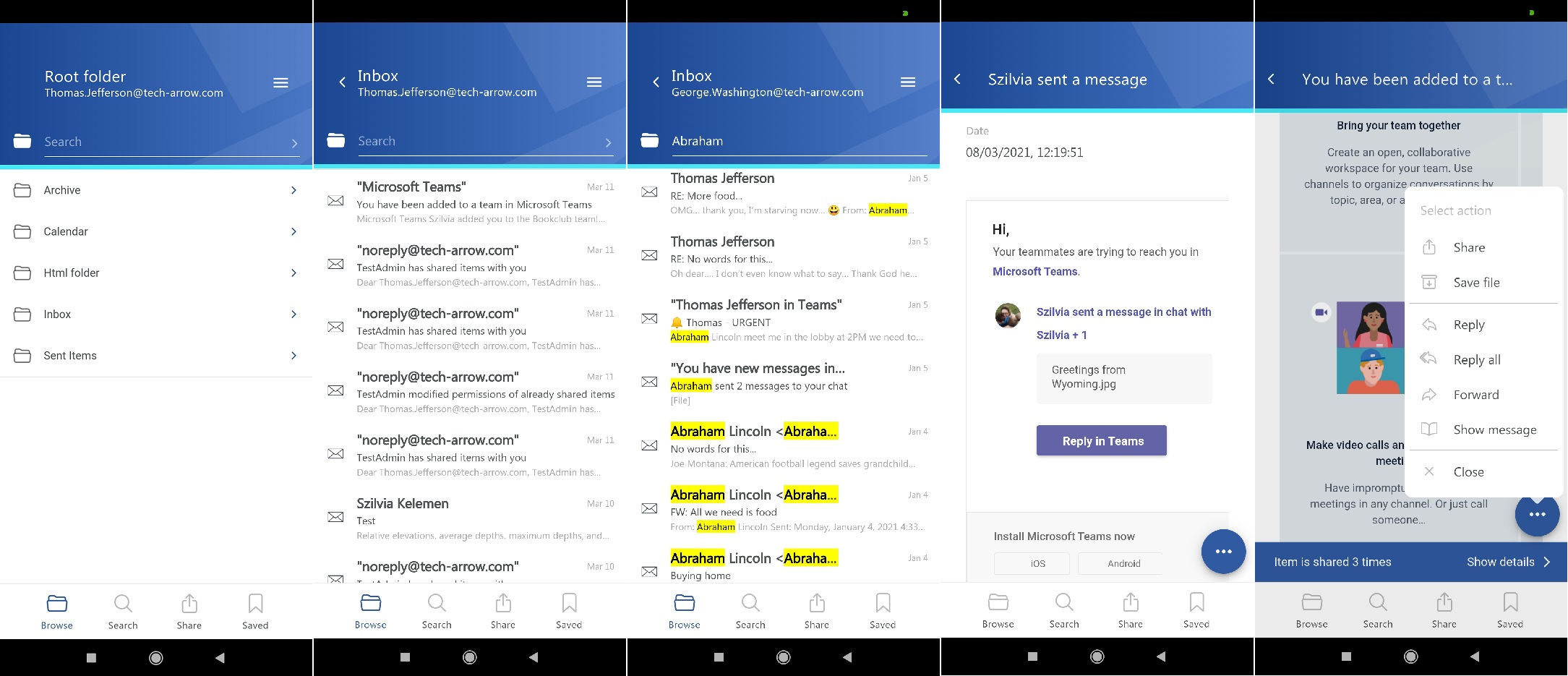
<p>Dynamics, simplicity, and productivity—these are the key factors that led to our decision to redesign TECH-ARROW’s contentACCESS Mobile app. The result speaks for itself!</p>
<p>The new design allows users to focus on important data and core functionality of our mobile app. Thanks to floating and swipe menus, data can be accessed faster with one hand. In combination with other great features like search suggestions, hit highlighting, and sharing, we were able to add even more real value to our contentACCESS Mobile application. So allow us to say that now every significant company data lies in your pocket!</p>
<p><img decoding="async" loading="lazy" alt="contentACCESS Mobile new look and feel" src="https://docs.tech-arrow.com/assets/images/daemon-camobile-newdesign01-40665e875e8060f56b1ce03fd10f0b76.png" width="513" height="474" class="img_ev3q"><br>
<img decoding="async" loading="lazy" alt="contentACCESS Mobile new look and feel" src="https://docs.tech-arrow.com/assets/images/daemon-camobile-newdesign02-3ca45d6207a38649536e395b060d79de.png" width="2169" height="935" class="img_ev3q"></p>
<p><strong>✓ Search suggestions</strong></p>
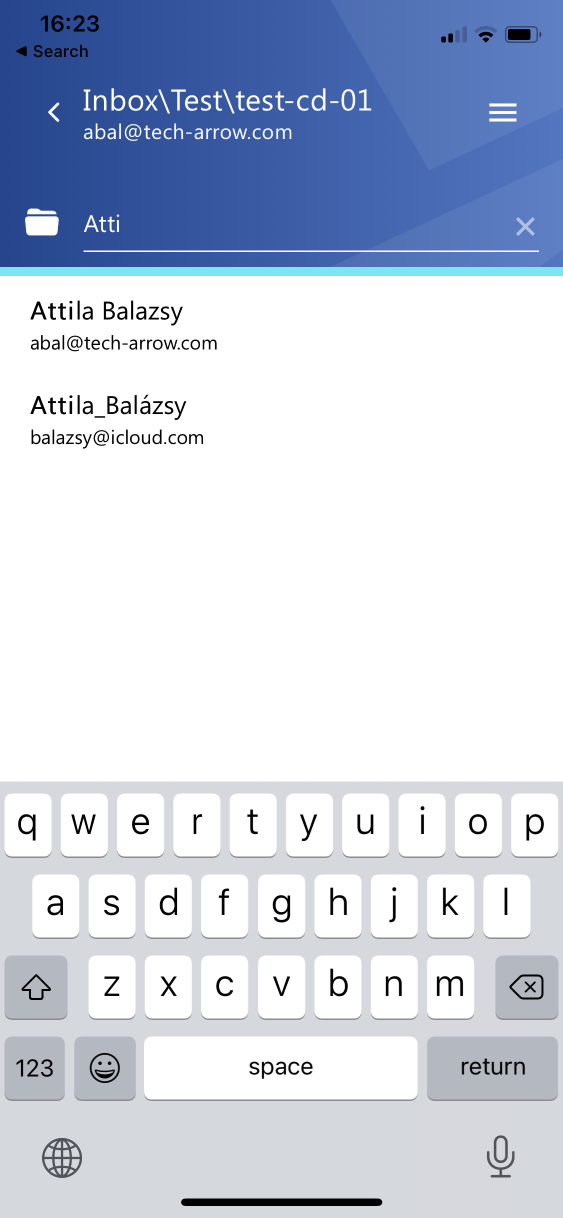
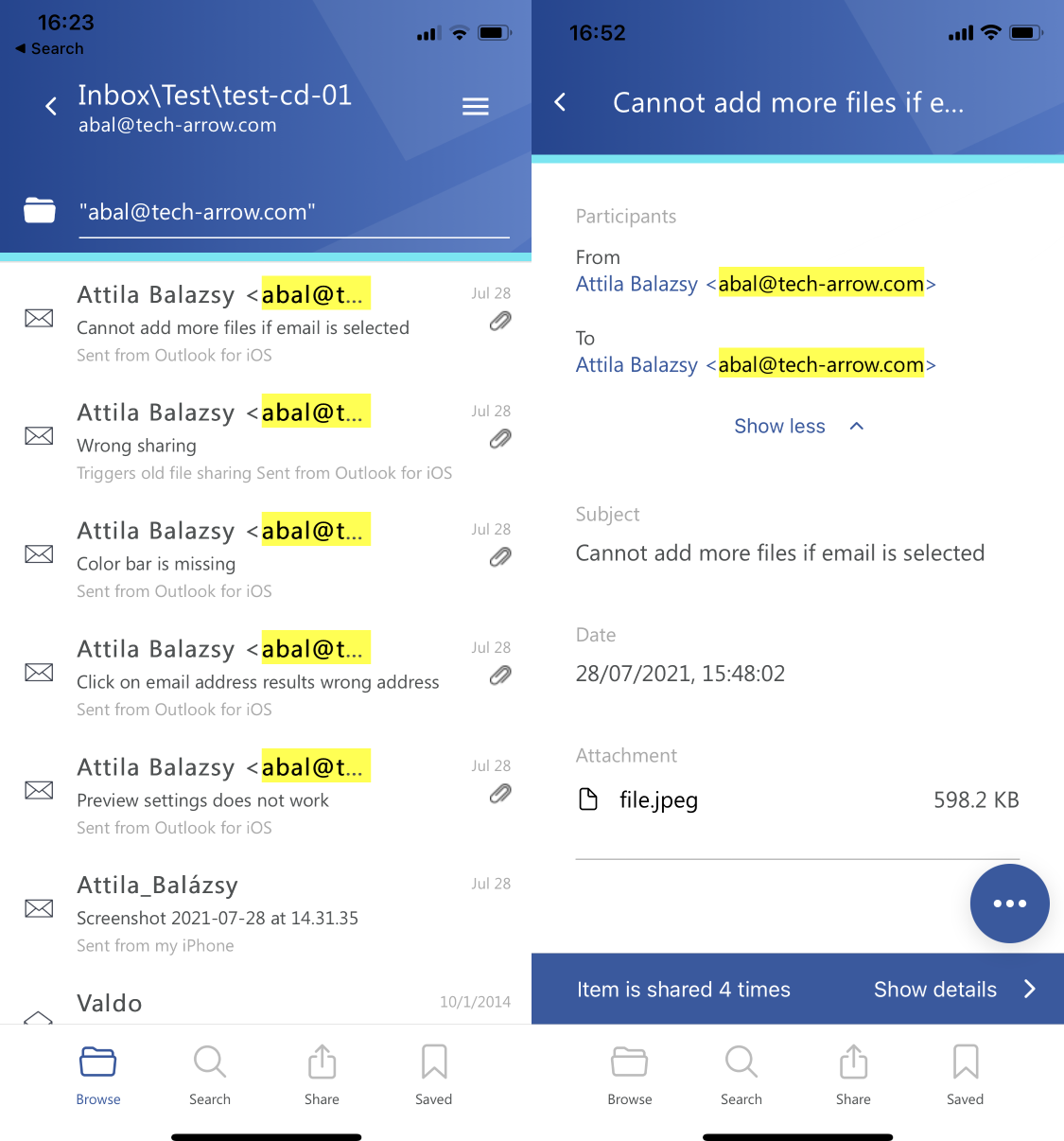
<p>Search suggestions allow you to find all relevant data you are looking for much faster. This feature is now also available in contentACCESS Mobile. It eliminates the need to type whole words or email addresses, which can sometimes be annoying and time-consuming. Suggestions are available in quick search as well as in global search options.</p>
<p><img decoding="async" loading="lazy" alt="contentACCESS Mobile search suggestion" src="https://docs.tech-arrow.com/assets/images/daemon-camobile-search-suggestions-d8e204b0e50414d64201e762b2a4183b.png" width="563" height="1218" class="img_ev3q"></p>
<p><strong>✓ Hit highlighting</strong></p>
<p>The search experience was already good, but we added some extras to make it even better—enjoy hit highlighting. Thanks to this feature, searched words located in longer texts or metadata are highlighted. The searched words are also highlighted on the item details page. Nothing is hidden from your eyes anymore!</p>
<p><img decoding="async" loading="lazy" alt="contentACCESS Mobile hit highlighting" src="https://docs.tech-arrow.com/assets/images/daemon-camobile-hit-highlighting-70b8af343c4267ab78d178f4c09c6406.png" width="1125" height="1206" class="img_ev3q"></p>
<p><strong>✓ Multi-selection</strong></p>
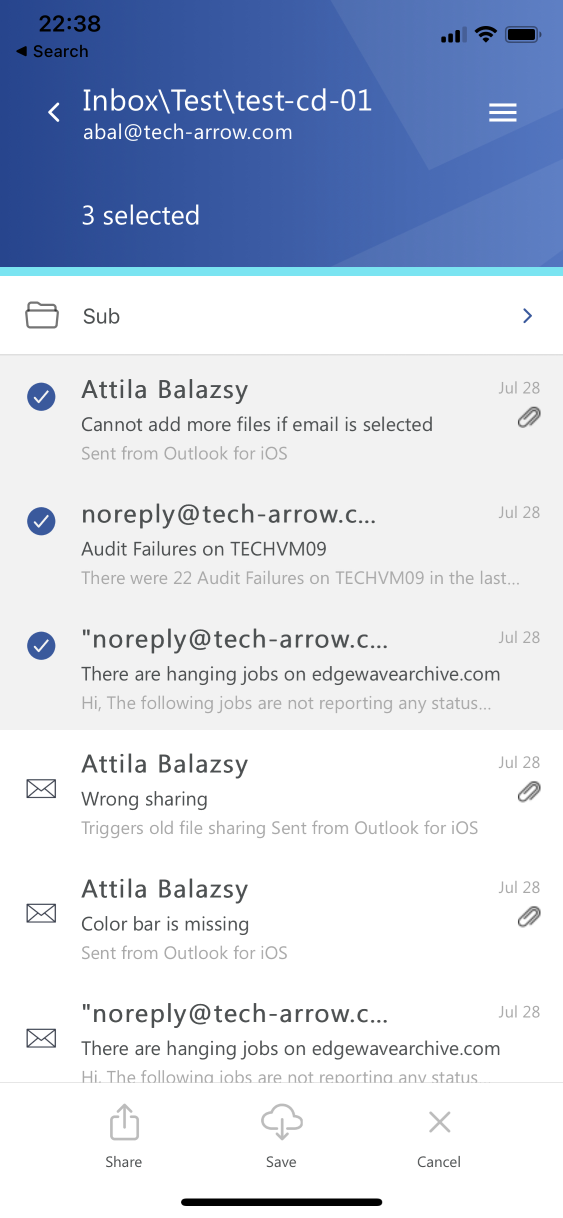
<p>This version of our mobile app allows you to select multiple items. Multi-selection can be activated by long-pressing an item. In multi-selection mode, item saving and item sharing features are available.</p>
<p><img decoding="async" loading="lazy" alt="contentACCESS Mobile multi-selection" src="https://docs.tech-arrow.com/assets/images/daemon-camobile-multiselect-d8dd7c58d5fadd62b26bc11262503ae1.png" width="563" height="1218" class="img_ev3q"></p>
<h2 class="anchor anchorTargetStickyNavbar_Vzrq" id="sharing">Sharing<a href="https://docs.tech-arrow.com/release/camobile/camobile-5-1#sharing" class="hash-link" aria-label="Direct link to Sharing" title="Direct link to Sharing" translate="no">​</a></h2>
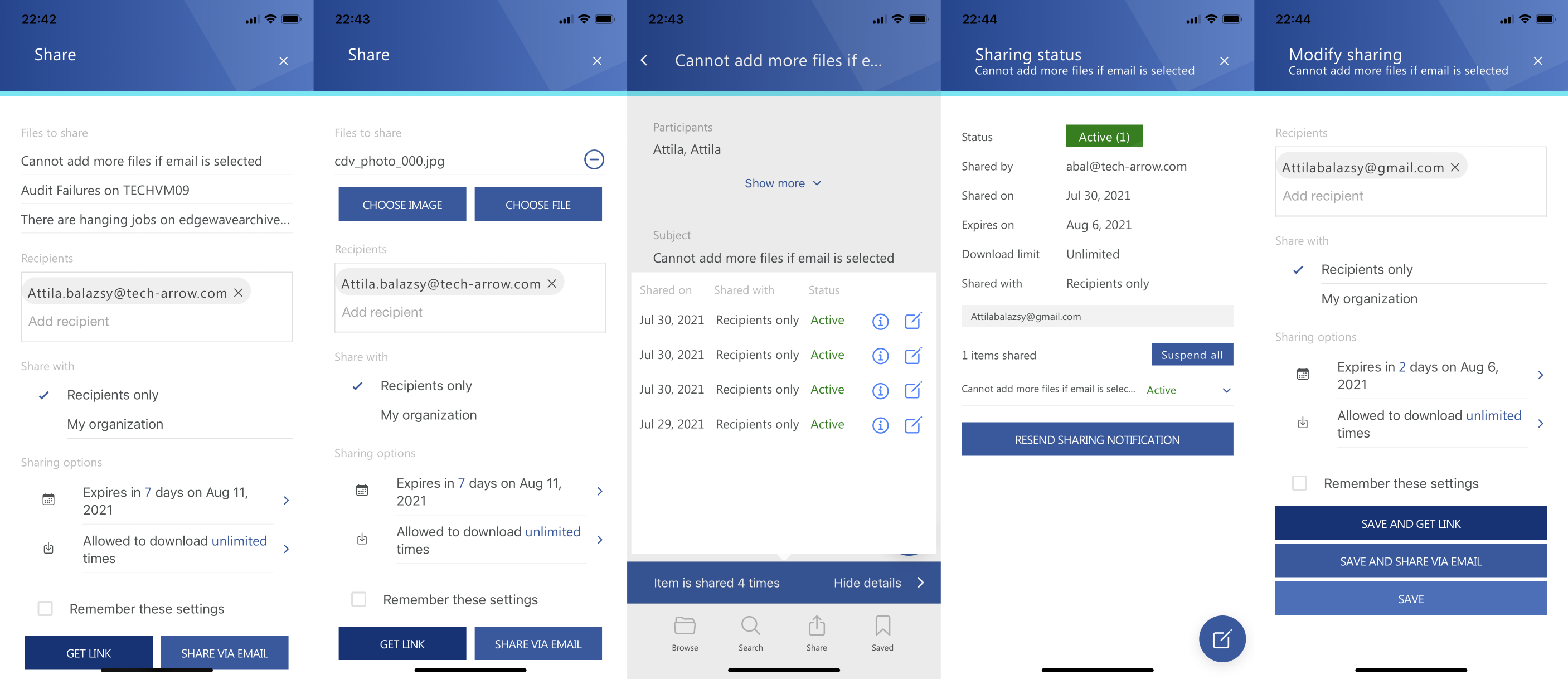
<p>In contentACCESS 5.0, we introduced our platform-level sharing feature. This feature is now also available in our contentACCESS Mobile app. You can share data directly from the contentACCESS archive in just two clicks. You can also view the download audit for an already shared item and modify sharing settings.</p>
<p>You can even share images or downloaded files from your mobile device directly using the same sharing feature. Just three clicks, and everything else is handled in the background by contentACCESS. Inviting the recipient to contentACCESS, sending the shared files, ensuring shared data retention, limiting downloads, and auditing access—everything is managed by the system!</p>
<p>Sounds good? Give it a try!</p>
<p><img decoding="async" loading="lazy" alt="Sharing in contentACCESS Mobile" src="https://docs.tech-arrow.com/assets/images/daemon-camobile-sharing-81a44decaec58b685abdcbf50ba61122.png" width="2813" height="1218" class="img_ev3q"></p>]]></content>
        <author>
            <name>Attila Balázsy</name>
        </author>
        <category label="contentACCESS Mobile" term="contentACCESS Mobile"/>
        <category label="Release" term="Release"/>
    </entry>
    <entry>
        <title type="html"><![CDATA[contentACCESS Mobile Version 1.0]]></title>
        <id>https://docs.tech-arrow.com/release/camobile/camobile-1-0</id>
        <link href="https://docs.tech-arrow.com/release/camobile/camobile-1-0"/>
        <updated>2018-02-02T00:00:00.000Z</updated>
        <summary type="html"><![CDATA[✨ Highlights]]></summary>
        <content type="html"><![CDATA[<h2 class="anchor anchorTargetStickyNavbar_Vzrq" id="-highlights">✨ Highlights<a href="https://docs.tech-arrow.com/release/camobile/camobile-1-0#-highlights" class="hash-link" aria-label="Direct link to ✨ Highlights" title="Direct link to ✨ Highlights" translate="no">​</a></h2>
<ul>
<li class="">Mobile access to archived content from multiple data sources, including File, Email, and SharePoint archives, directly from your device.</li>
<li class="">Flexible sharing options that allow items to be shared either as full binaries or as lightweight links, even with limited connectivity.</li>
<li class="">Offline access to stored items, enabling continued work without an internet connection.</li>
</ul>
<h3 class="anchor anchorTargetStickyNavbar_Vzrq" id="features">Features<a href="https://docs.tech-arrow.com/release/camobile/camobile-1-0#features" class="hash-link" aria-label="Direct link to Features" title="Direct link to Features" translate="no">​</a></h3>
<p><strong>✓ Data browsing:</strong> The Browse tab allows users to browse archived content from selected data sources (File archive, Email archive, or SharePoint archive), as well as other items from data sources managed by contentACCESS. All folders and subfolders are visible. The layout of items displayed in the item list can be customized on the Settings tab—you can show or hide previews, categories, and flags in the list.</p>
<p><strong>✓ Preview of items:</strong> We know how valuable your time is. That’s why we designed contentACCESS Mobile to allow you to quickly access and preview the important details of items managed by contentACCESS.</p>
<p>contentACCESS Mobile allows users to preview the email body and access attachments and other properties. It is also possible to view the full original body of an email with a single button click.</p>
<p>Items, emails, or attachments can also be saved; however, a program, feature, or application capable of opening the item must be present on the phone.</p>
<p><strong>✓ Share items as binaries or links:</strong> Are you stuck in traffic but your colleagues need some emails right away? Simply share them using contentACCESS Mobile. The sharing functionality allows you to share items either directly or as a link. If you need to minimize data usage or the internet connection is slow, the <strong>Share link</strong> option is the way to go—you won’t need to transfer the whole file, only a link pointing to it.</p>
<p><strong>✓ Store items for offline access:</strong> Won’t you have internet access everywhere during your business trip? No worries—items can be stored locally and used later in offline mode. All items available for offline access are listed in a common list.</p>
<p><strong>✓ Search:</strong> Search across all available data sources and archives with just a few simple clicks. Use predefined hints (optional) or specify properties manually. The same search query language used in other contentACCESS client applications is supported, allowing users to easily find emails, files, and SharePoint documents managed by contentACCESS directly from their mobile devices.</p>
<p><strong>✓ Multi-language support:</strong> Because we strive to satisfy all our customers’ needs and make our apps as easy to use and understand as possible, contentACCESS Mobile is available in five languages (as are all our apps): English, German, Norwegian, Chinese (Simplified), and Portuguese. The language can be changed at any time on the <strong>Settings</strong> tab.</p>]]></content>
        <author>
            <name>Attila Balázsy</name>
        </author>
        <category label="contentACCESS Mobile" term="contentACCESS Mobile"/>
        <category label="Release" term="Release"/>
    </entry>
</feed>