<?xml version="1.0" encoding="utf-8"?><?xml-stylesheet type="text/xsl" href="atom.xsl"?>
<feed xmlns="http://www.w3.org/2005/Atom">
    <id>https://docs.tech-arrow.com/release/officegate</id>
    <title>Tech-Arrow Documentation Blog</title>
    <updated>2025-12-17T00:00:00.000Z</updated>
    <generator>https://github.com/jpmonette/feed</generator>
    <link rel="alternate" href="https://docs.tech-arrow.com/release/officegate"/>
    <subtitle>Tech-Arrow Documentation Blog</subtitle>
    <icon>https://docs.tech-arrow.com/img/favicon.ico</icon>
    <entry>
        <title type="html"><![CDATA[officeGATE Version 7.2]]></title>
        <id>https://docs.tech-arrow.com/release/officegate/officegate-7-2</id>
        <link href="https://docs.tech-arrow.com/release/officegate/officegate-7-2"/>
        <updated>2025-12-17T00:00:00.000Z</updated>
        <summary type="html"><![CDATA[✨ Highlights]]></summary>
        <content type="html"><![CDATA[<h2 class="anchor anchorTargetStickyNavbar_Vzrq" id="-highlights">✨ Highlights<a href="https://docs.tech-arrow.com/release/officegate/officegate-7-2#-highlights" class="hash-link" aria-label="Direct link to ✨ Highlights" title="Direct link to ✨ Highlights" translate="no">​</a></h2>
<ul>
<li class="">Added support for the new login page introduced in contentACCESS 7.2.</li>
<li class="">WebView2 is now a required component and will be installed automatically during setup.</li>
<li class="">Fixed an issue that caused Outlook to freeze after each re-login.</li>
<li class="">Resolved a problem where duplicate officeGATE panels appeared after an Outlook update.</li>
<li class="">Fixed installation issues with Microsoft VSTO 2010 Runtime on 64-bit systems.</li>
</ul>
<h2 class="anchor anchorTargetStickyNavbar_Vzrq" id="common">Common<a href="https://docs.tech-arrow.com/release/officegate/officegate-7-2#common" class="hash-link" aria-label="Direct link to Common" title="Direct link to Common" translate="no">​</a></h2>
<ul>
<li class=""><span class="release-badge" style="background-color:#1a73e8;color:#fff;border-radius:6px;padding:2px 8px;font-size:0.7rem;font-weight:600;margin-right:0.5rem;vertical-align:middle">NEW</span> Added support for the new login page introduced in contentACCESS 7.2.</li>
<li class=""><span class="release-badge" style="background-color:#1a73e8;color:#fff;border-radius:6px;padding:2px 8px;font-size:0.7rem;font-weight:600;margin-right:0.5rem;vertical-align:middle">NEW</span> WebView2 is now a required component and will be installed automatically during setup.</li>
<li class=""><span class="release-badge" style="background-color:#188038;color:#fff;border-radius:6px;padding:2px 8px;font-size:0.7rem;font-weight:600;margin-right:0.5rem;vertical-align:middle">IMPROVEMENT</span> Resolved an issue that caused Outlook to freeze after each re-login.</li>
<li class=""><span class="release-badge" style="background-color:#188038;color:#fff;border-radius:6px;padding:2px 8px;font-size:0.7rem;font-weight:600;margin-right:0.5rem;vertical-align:middle">IMPROVEMENT</span> Fixed a problem where two officeGATE panels appeared after an Outlook update.</li>
<li class=""><span class="release-badge" style="background-color:#188038;color:#fff;border-radius:6px;padding:2px 8px;font-size:0.7rem;font-weight:600;margin-right:0.5rem;vertical-align:middle">IMPROVEMENT</span> Fixed the installation of Microsoft VSTO 2010 Runtime on 64-bit systems.</li>
</ul>
<h2 class="anchor anchorTargetStickyNavbar_Vzrq" id="email-backup">Email backup<a href="https://docs.tech-arrow.com/release/officegate/officegate-7-2#email-backup" class="hash-link" aria-label="Direct link to Email backup" title="Direct link to Email backup" translate="no">​</a></h2>
<ul>
<li class=""><span class="release-badge" style="background-color:#188038;color:#fff;border-radius:6px;padding:2px 8px;font-size:0.7rem;font-weight:600;margin-right:0.5rem;vertical-align:middle">IMPROVEMENT</span> Fixed an issue where Email Backup failed when sending messages as a ZIP file due to a size mismatch error.</li>
</ul>]]></content>
        <author>
            <name>Attila Balázsy</name>
        </author>
        <category label="officeGATE" term="officeGATE"/>
        <category label="Release" term="Release"/>
    </entry>
    <entry>
        <title type="html"><![CDATA[officeGATE Version 7.0]]></title>
        <id>https://docs.tech-arrow.com/release/officegate/officegate-7-0</id>
        <link href="https://docs.tech-arrow.com/release/officegate/officegate-7-0"/>
        <updated>2025-03-19T00:00:00.000Z</updated>
        <summary type="html"><![CDATA[✨ Highlights]]></summary>
        <content type="html"><![CDATA[<h2 class="anchor anchorTargetStickyNavbar_Vzrq" id="-highlights">✨ Highlights<a href="https://docs.tech-arrow.com/release/officegate/officegate-7-0#-highlights" class="hash-link" aria-label="Direct link to ✨ Highlights" title="Direct link to ✨ Highlights" translate="no">​</a></h2>
<ul>
<li class="">Improved Email archive shortcut opening with new configuration options.</li>
<li class="">Fixed an Outlook freeze that could occur after prolonged inactivity in the officeGATE search window.</li>
<li class="">Resolved multiple 32-bit Outlook issues, including icon retrieval errors and empty folder displays.</li>
<li class="">Improved reliability with fixes for server name saving, offline synchronization, Outlook Calendar access errors, and folder sharing details.</li>
</ul>
<h2 class="anchor anchorTargetStickyNavbar_Vzrq" id="email-archive">Email archive<a href="https://docs.tech-arrow.com/release/officegate/officegate-7-0#email-archive" class="hash-link" aria-label="Direct link to Email archive" title="Direct link to Email archive" translate="no">​</a></h2>
<ul>
<li class=""><span class="release-badge" style="background-color:#1a73e8;color:#fff;border-radius:6px;padding:2px 8px;font-size:0.7rem;font-weight:600;margin-right:0.5rem;vertical-align:middle">NEW</span> Optimized shortcut opening; you can now configure, how officeGATE opens the Email archive shortcuts.</li>
<li class=""><span class="release-badge" style="background-color:#188038;color:#fff;border-radius:6px;padding:2px 8px;font-size:0.7rem;font-weight:600;margin-right:0.5rem;vertical-align:middle">IMPROVEMENT</span> Resolved Outlook freeze after prolonged inactivity in officeGATE search window.</li>
</ul>
<h2 class="anchor anchorTargetStickyNavbar_Vzrq" id="common">Common<a href="https://docs.tech-arrow.com/release/officegate/officegate-7-0#common" class="hash-link" aria-label="Direct link to Common" title="Direct link to Common" translate="no">​</a></h2>
<ul>
<li class=""><span class="release-badge" style="background-color:#188038;color:#fff;border-radius:6px;padding:2px 8px;font-size:0.7rem;font-weight:600;margin-right:0.5rem;vertical-align:middle">IMPROVEMENT</span> Server name save issue fixed; changes now save without reselecting the URL checkbox.</li>
<li class=""><span class="release-badge" style="background-color:#188038;color:#fff;border-radius:6px;padding:2px 8px;font-size:0.7rem;font-weight:600;margin-right:0.5rem;vertical-align:middle">IMPROVEMENT</span> Resolved an error in icon retrieval in 32bit Outlook.</li>
<li class=""><span class="release-badge" style="background-color:#188038;color:#fff;border-radius:6px;padding:2px 8px;font-size:0.7rem;font-weight:600;margin-right:0.5rem;vertical-align:middle">IMPROVEMENT</span> Fixed issue causing empty folders display in 32bit Outlook.</li>
<li class=""><span class="release-badge" style="background-color:#188038;color:#fff;border-radius:6px;padding:2px 8px;font-size:0.7rem;font-weight:600;margin-right:0.5rem;vertical-align:middle">IMPROVEMENT</span> Offline sync issue resolved, synchronized items can now be saved successfully.</li>
<li class=""><span class="release-badge" style="background-color:#188038;color:#fff;border-radius:6px;padding:2px 8px;font-size:0.7rem;font-weight:600;margin-right:0.5rem;vertical-align:middle">IMPROVEMENT</span> Resolved “Access Denied” error in Outlook Calendar.</li>
<li class=""><span class="release-badge" style="background-color:#188038;color:#fff;border-radius:6px;padding:2px 8px;font-size:0.7rem;font-weight:600;margin-right:0.5rem;vertical-align:middle">IMPROVEMENT</span> Folder sharing details now displayed accurately in the Properties tab.</li>
</ul>]]></content>
        <author>
            <name>Attila Balázsy</name>
        </author>
        <category label="officeGATE" term="officeGATE"/>
        <category label="Release" term="Release"/>
    </entry>
    <entry>
        <title type="html"><![CDATA[officeGATE Version 6.3]]></title>
        <id>https://docs.tech-arrow.com/release/officegate/officegate-6-3</id>
        <link href="https://docs.tech-arrow.com/release/officegate/officegate-6-3"/>
        <updated>2024-04-03T00:00:00.000Z</updated>
        <summary type="html"><![CDATA[✨ Highlights]]></summary>
        <content type="html"><![CDATA[<h2 class="anchor anchorTargetStickyNavbar_Vzrq" id="-highlights">✨ Highlights<a href="https://docs.tech-arrow.com/release/officegate/officegate-6-3#-highlights" class="hash-link" aria-label="Direct link to ✨ Highlights" title="Direct link to ✨ Highlights" translate="no">​</a></h2>
<ul>
<li class="">Search now works correctly within a folder, improving navigation in Teams archives.</li>
<li class="">Fixed an issue when opening files from the list view using the “Open” context menu.</li>
<li class="">Added support for installing officeGATE on a drive other than C:.</li>
<li class="">Improved handling of archived video files so they are properly listed.</li>
<li class="">Includes small UI improvements along with performance and stability fixes.</li>
</ul>
<h2 class="anchor anchorTargetStickyNavbar_Vzrq" id="teams-archive">Teams archive<a href="https://docs.tech-arrow.com/release/officegate/officegate-6-3#teams-archive" class="hash-link" aria-label="Direct link to Teams archive" title="Direct link to Teams archive" translate="no">​</a></h2>
<ul>
<li class=""><span class="release-badge" style="background-color:#188038;color:#fff;border-radius:6px;padding:2px 8px;font-size:0.7rem;font-weight:600;margin-right:0.5rem;vertical-align:middle">IMPROVEMENT</span> Search now works within a folder</li>
<li class=""><span class="release-badge" style="background-color:#188038;color:#fff;border-radius:6px;padding:2px 8px;font-size:0.7rem;font-weight:600;margin-right:0.5rem;vertical-align:middle">IMPROVEMENT</span> Fixed issue when opening a file from the list view using the ‘Open’ context menu</li>
</ul>
<h2 class="anchor anchorTargetStickyNavbar_Vzrq" id="common">Common<a href="https://docs.tech-arrow.com/release/officegate/officegate-6-3#common" class="hash-link" aria-label="Direct link to Common" title="Direct link to Common" translate="no">​</a></h2>
<ul>
<li class=""><span class="release-badge" style="background-color:#188038;color:#fff;border-radius:6px;padding:2px 8px;font-size:0.7rem;font-weight:600;margin-right:0.5rem;vertical-align:middle">IMPROVEMENT</span> Support for installing officeGATE to a different drive than C:\</li>
<li class=""><span class="release-badge" style="background-color:#188038;color:#fff;border-radius:6px;padding:2px 8px;font-size:0.7rem;font-weight:600;margin-right:0.5rem;vertical-align:middle">IMPROVEMENT</span> Small UI fixes</li>
<li class=""><span class="release-badge" style="background-color:#188038;color:#fff;border-radius:6px;padding:2px 8px;font-size:0.7rem;font-weight:600;margin-right:0.5rem;vertical-align:middle">IMPROVEMENT</span> Archived video files were not listed</li>
<li class=""><span class="release-badge" style="background-color:#188038;color:#fff;border-radius:6px;padding:2px 8px;font-size:0.7rem;font-weight:600;margin-right:0.5rem;vertical-align:middle">IMPROVEMENT</span> Fixed email opening in Outlook 2016 from search results</li>
<li class=""><span class="release-badge" style="background-color:#188038;color:#fff;border-radius:6px;padding:2px 8px;font-size:0.7rem;font-weight:600;margin-right:0.5rem;vertical-align:middle">IMPROVEMENT</span> Performance and stability fixes</li>
</ul>]]></content>
        <author>
            <name>Attila Balázsy</name>
        </author>
        <category label="officeGATE" term="officeGATE"/>
        <category label="Release" term="Release"/>
    </entry>
    <entry>
        <title type="html"><![CDATA[officeGATE Version 6.1 SP1]]></title>
        <id>https://docs.tech-arrow.com/release/officegate/officegate-6-1-sp1</id>
        <link href="https://docs.tech-arrow.com/release/officegate/officegate-6-1-sp1"/>
        <updated>2023-08-04T00:00:00.000Z</updated>
        <summary type="html"><![CDATA[✨ Highlights]]></summary>
        <content type="html"><![CDATA[<h2 class="anchor anchorTargetStickyNavbar_Vzrq" id="-highlights">✨ Highlights<a href="https://docs.tech-arrow.com/release/officegate/officegate-6-1-sp1#-highlights" class="hash-link" aria-label="Direct link to ✨ Highlights" title="Direct link to ✨ Highlights" translate="no">​</a></h2>
<ul>
<li class="">Corrects misleading error messages when uploading files to the email archive.</li>
<li class="">Ensures the contentACCESS provider reliably reconnects after an Outlook restart.</li>
<li class="">Restores the availability of manual archive and restore when contentACCESS is deployed on a non-standard port.</li>
</ul>
<h2 class="anchor anchorTargetStickyNavbar_Vzrq" id="email-archive">Email archive<a href="https://docs.tech-arrow.com/release/officegate/officegate-6-1-sp1#email-archive" class="hash-link" aria-label="Direct link to Email archive" title="Direct link to Email archive" translate="no">​</a></h2>
<ul>
<li class=""><span class="release-badge" style="background-color:#188038;color:#fff;border-radius:6px;padding:2px 8px;font-size:0.7rem;font-weight:600;margin-right:0.5rem;vertical-align:middle">IMPROVEMENT</span> Upload file to email archive fails with an inappropriate error message</li>
<li class=""><span class="release-badge" style="background-color:#188038;color:#fff;border-radius:6px;padding:2px 8px;font-size:0.7rem;font-weight:600;margin-right:0.5rem;vertical-align:middle">IMPROVEMENT</span> contentACCESS provider is not re-connecting after Outlook restart</li>
<li class=""><span class="release-badge" style="background-color:#188038;color:#fff;border-radius:6px;padding:2px 8px;font-size:0.7rem;font-weight:600;margin-right:0.5rem;vertical-align:middle">IMPROVEMENT</span> Manual archive and restore is not available if contentACCESS is deployed to a non-standard port</li>
</ul>]]></content>
        <author>
            <name>Attila Balázsy</name>
        </author>
        <category label="officeGATE" term="officeGATE"/>
        <category label="Release" term="Release"/>
        <category label="Service Pack 1" term="Service Pack 1"/>
    </entry>
    <entry>
        <title type="html"><![CDATA[officeGATE Version 6.1]]></title>
        <id>https://docs.tech-arrow.com/release/officegate/officegate-6-1</id>
        <link href="https://docs.tech-arrow.com/release/officegate/officegate-6-1"/>
        <updated>2023-04-11T00:00:00.000Z</updated>
        <summary type="html"><![CDATA[✨ Highlights]]></summary>
        <content type="html"><![CDATA[<h2 class="anchor anchorTargetStickyNavbar_Vzrq" id="-highlights">✨ Highlights<a href="https://docs.tech-arrow.com/release/officegate/officegate-6-1#-highlights" class="hash-link" aria-label="Direct link to ✨ Highlights" title="Direct link to ✨ Highlights" translate="no">​</a></h2>
<ul>
<li class="">officeGATE is now a full replacement for the legacy contentACCESS VSTO Add-in, including an email archive shortcut and access to previously missing features.</li>
<li class="">Integrated contentACCESS web preview lets you open, read, and copy text from attachments without installing native applications.</li>
<li class="">New dark mode support allows users to choose between light and dark themes for a more comfortable working experience.</li>
<li class="">Automatic Outlook language detection simplifies deployments by using Outlook’s language setting, with fallback to English.</li>
<li class="">Attachments can now be shared directly from the item preview, reducing clicks and improving efficiency.</li>
</ul>
<h2 class="anchor anchorTargetStickyNavbar_Vzrq" id="email-archive">Email archive<a href="https://docs.tech-arrow.com/release/officegate/officegate-6-1#email-archive" class="hash-link" aria-label="Direct link to Email archive" title="Direct link to Email archive" translate="no">​</a></h2>
<p><strong>✓ Email archive shortcut opening</strong></p>
<p>As the Outlook forms capabilities are very limited, some functions had to be implemented in managed code. For this purpose, we created a simple Outlook add-in called the contentACCESS VSTO Add-in several years ago. This add-in was not developed further for a time, as we focused our energy on officeGATE, which is a superior and more feature-rich contentACCESS client for Outlook.<br>
<!-- -->However, some functions from the contentACCESS VSTO Add-in were not supported by officeGATE. Today, I am proud to announce that we have completed this journey and moved all missing features. officeGATE is now a full replacement for the old contentACCESS VSTO Add-in, with the potential to do much more. For example, you can now make use of offline access, data browsing, and search.<br>
<!-- -->Don’t hesitate to switch over to officeGATE!</p>
<h2 class="anchor anchorTargetStickyNavbar_Vzrq" id="common">Common<a href="https://docs.tech-arrow.com/release/officegate/officegate-6-1#common" class="hash-link" aria-label="Direct link to Common" title="Direct link to Common" translate="no">​</a></h2>
<p><strong>✓ Preview service integration</strong></p>
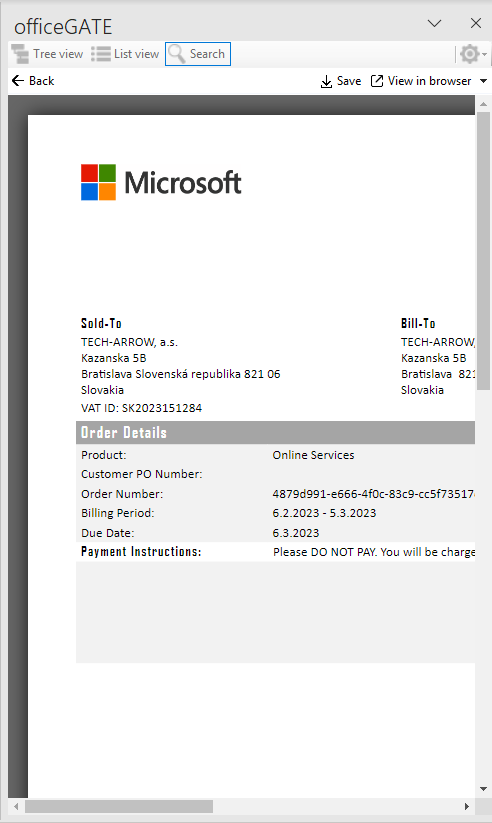
<p>The contentACCESS web preview was introduced in version 6.0. This great feature was already implemented in contentACCESS Mobile and Portal and is now also available in officeGATE. This means that you can open, read, and copy text from any attachment without having the native application installed.</p>
<p><img decoding="async" loading="lazy" alt="contentACCESS document preview" src="https://docs.tech-arrow.com/assets/images/og-6-1-preview01-0ac8fa5f889ce18c0c9f746f6ca1e4dc.png" width="492" height="823" class="img_ev3q"></p>
<p><strong>✓ Dark mode support</strong></p>
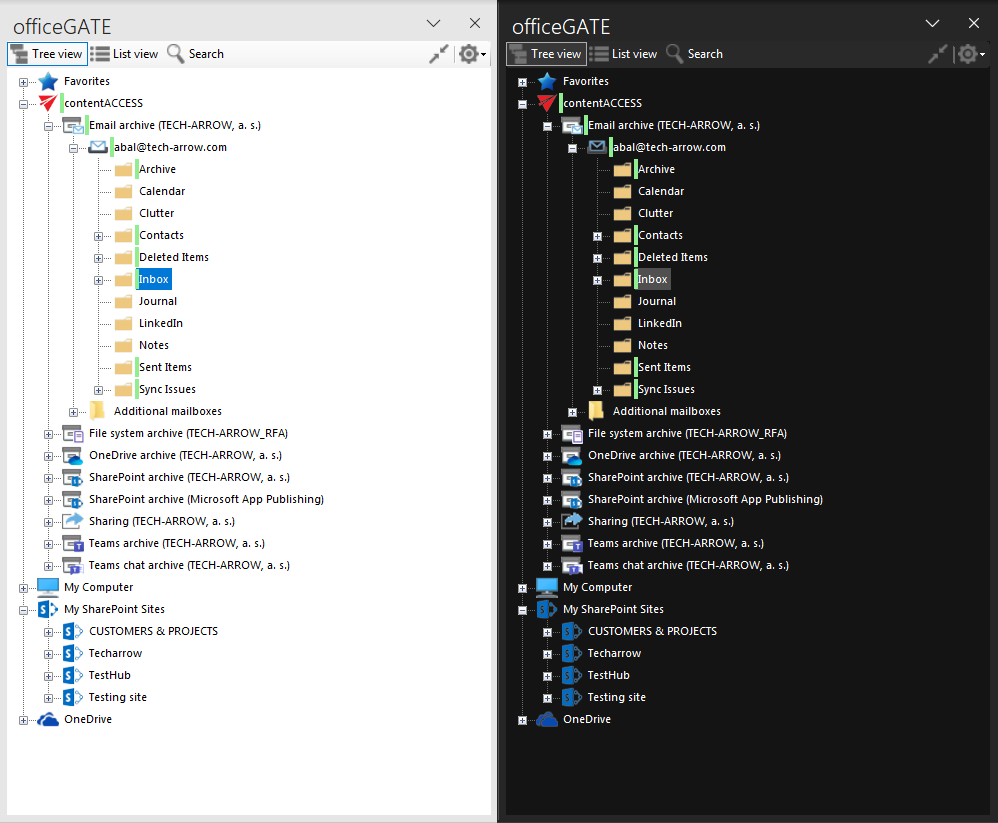
<p>More and more users prefer using applications in dark mode, mainly during night working hours. Some experts say it is easier and healthier to read text against a dark background, while others say the opposite. At TECH-ARROW, we are not taking sides, but instead give each user the right to decide. From version 6.1, officeGATE users can choose between light and dark themes.<br>
<!-- -->Try it and use your favorite theme!</p>
<p><img decoding="async" loading="lazy" alt="Dark theme" src="https://docs.tech-arrow.com/assets/images/og-6-1-darkmode01-ffca3c4eba5dd04ce0a83007b44e1ca9.png" width="998" height="823" class="img_ev3q"></p>
<p><strong>✓ Auto-detect Outlook language</strong></p>
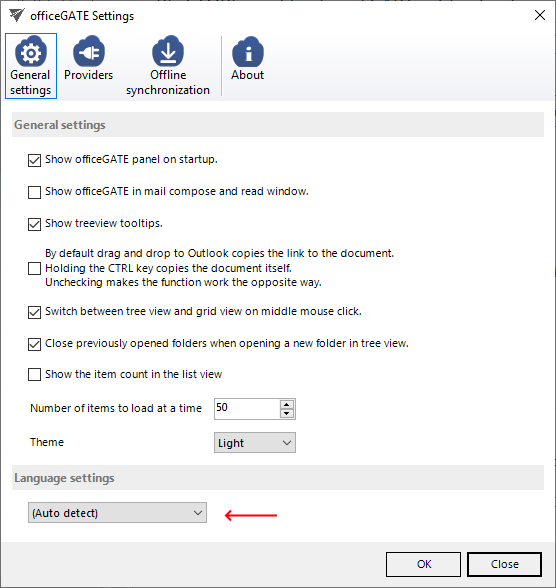
<p>officeGATE supports multiple languages. In former versions, users had to select their desired language during installation or later in the officeGATE settings. The situation was further complicated in the case of group policy-based deployments, where administrators had to select the correct language for each user. We have now introduced an auto-detect language option, which automatically uses Outlook’s selected language for officeGATE. If the Outlook language is not supported by officeGATE, it will fall back to English, but users can still select their preferred language manually.</p>
<p><img decoding="async" loading="lazy" alt="Auto-detect Outlook language" src="https://docs.tech-arrow.com/assets/images/og-6-1-autodetect-language01-41494a4c55dab0e294c981bbc22aa43c.png" width="556" height="588" class="img_ev3q"></p>
<p><strong>✓ Share attachments from item preview</strong></p>
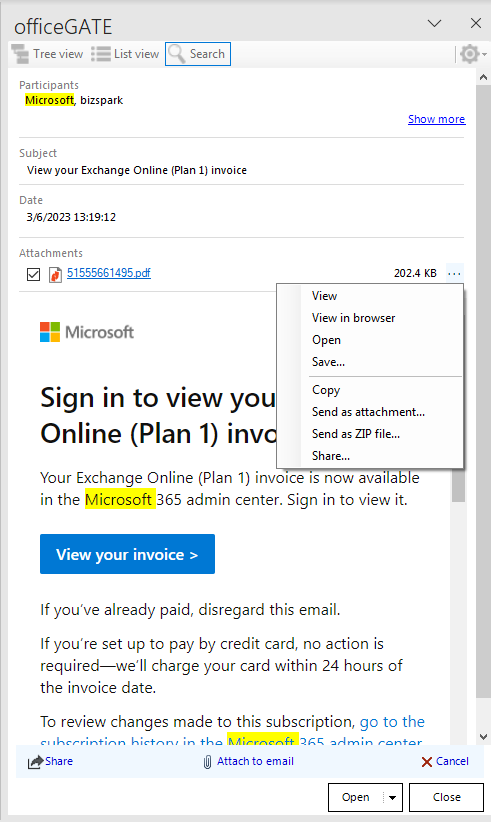
<p>We have made changes to the item details view to make working with officeGATE easier and more efficient. One of the most important changes is the ability to share an attachment directly from this view. This eliminates several extra clicks compared to the previous functionality.</p>
<p><img decoding="async" loading="lazy" alt="Share attachment from item preview" src="https://docs.tech-arrow.com/assets/images/og-6-1-share-attachment01-fbda2063089595b968c5ce6bb6c9135c.png" width="491" height="822" class="img_ev3q"></p>
<p><strong>✓ Using WebView2</strong></p>
<p>For some functionality, such as previews and message bodies, officeGATE uses an integrated web browser. Previously, this browser used the old Internet Explorer rendering engine, which resulted in unexpected display issues. officeGATE will now check for the existence of WebView2 on the system and use this modern web rendering engine to display HTML content whenever possible. As a result, users will see better and more performant HTML content.</p>
<p><strong>✓ Performance and stability fixes</strong></p>
<p>Improvements were made to make the system faster and more stable, so your officeGATE experience is now even better than before.</p>
<h2 class="anchor anchorTargetStickyNavbar_Vzrq" id="update-from-older-versions">Update from older versions<a href="https://docs.tech-arrow.com/release/officegate/officegate-6-1#update-from-older-versions" class="hash-link" aria-label="Direct link to Update from older versions" title="Direct link to Update from older versions" translate="no">​</a></h2>
<p><strong>✓ .NET Framework support:</strong> The minimum required .NET version was increased from 4.5.2 to 4.8 for all applications.</p>
<p><strong>✓ Update path:</strong> Updating from older versions of officeGATE is supported.</p>]]></content>
        <author>
            <name>Attila Balázsy</name>
        </author>
        <category label="officeGATE" term="officeGATE"/>
        <category label="Release" term="Release"/>
    </entry>
    <entry>
        <title type="html"><![CDATA[officeGATE Version 5.3]]></title>
        <id>https://docs.tech-arrow.com/release/officegate/officegate-5-3</id>
        <link href="https://docs.tech-arrow.com/release/officegate/officegate-5-3"/>
        <updated>2022-06-09T00:00:00.000Z</updated>
        <summary type="html"><![CDATA[✨ Highlights]]></summary>
        <content type="html"><![CDATA[<h2 class="anchor anchorTargetStickyNavbar_Vzrq" id="-highlights">✨ Highlights<a href="https://docs.tech-arrow.com/release/officegate/officegate-5-3#-highlights" class="hash-link" aria-label="Direct link to ✨ Highlights" title="Direct link to ✨ Highlights" translate="no">​</a></h2>
<ul>
<li class="">Integration with the TECH-ARROW Store, including subscription expiration notifications and direct access to subscription management from within officeGATE.</li>
<li class="">Performance and stability improvements for a faster and more reliable contentACCESS experience.</li>
</ul>
<h2 class="anchor anchorTargetStickyNavbar_Vzrq" id="common">Common<a href="https://docs.tech-arrow.com/release/officegate/officegate-5-3#common" class="hash-link" aria-label="Direct link to Common" title="Direct link to Common" translate="no">​</a></h2>
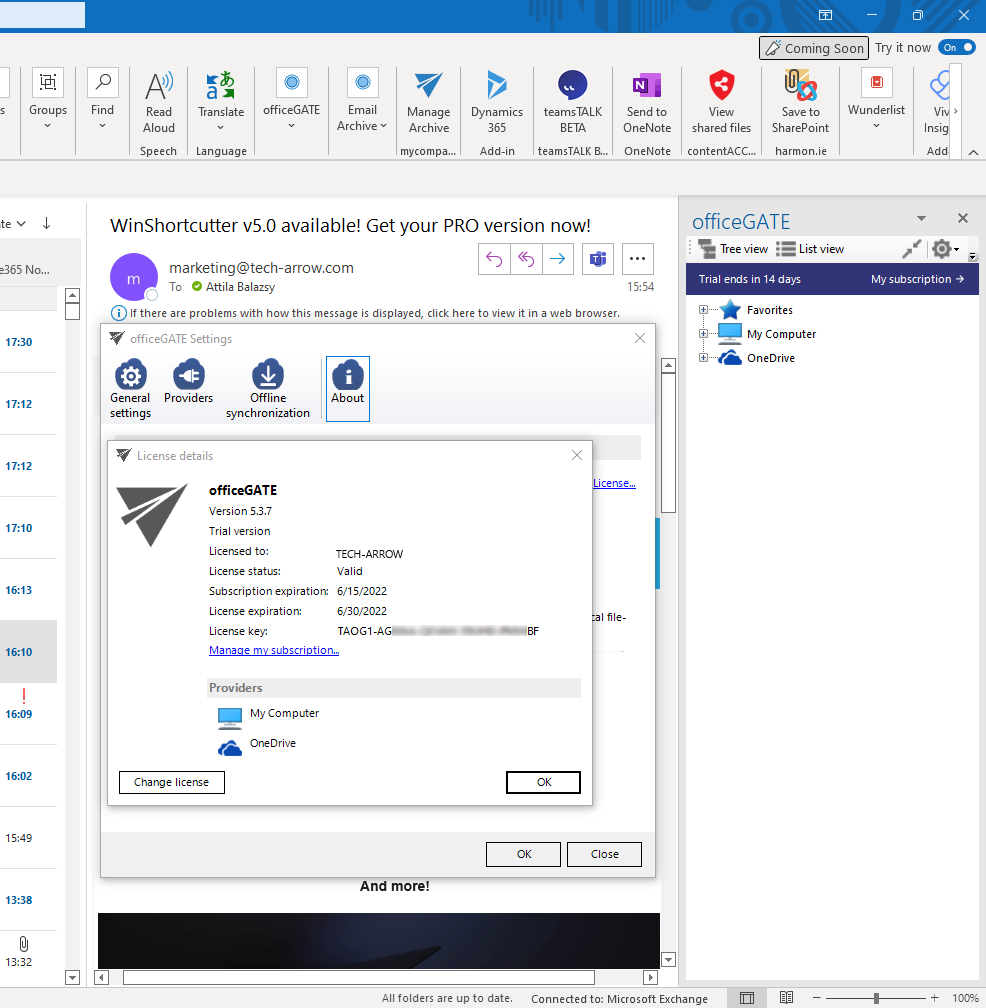
<p><strong>✓ TECH-ARROW Store integration</strong></p>
<p>Last year, we successfully launched our TECH-ARROW store. It provides self-service to buy our products. Now officeGATE is integrated with the TECH-ARROW store as well. This new version of officeGATE will notify you about the subscription expiration date and you will be able to directly open your subscription management page from officeGATE.</p>
<p><img decoding="async" loading="lazy" alt="TECH-ARROW Store integration into officeGATE" src="https://docs.tech-arrow.com/assets/images/og-store-integration01-6eb70ae3be7700438c73fc37cbf5fe10.png" width="986" height="1008" class="img_ev3q"></p>
<p><strong>✓ Performance and stability fixes</strong></p>
<p>Improvements were made to make the system faster and more stable, so your contentACCESS experience could be better than it has ever been before.</p>]]></content>
        <author>
            <name>Attila Balázsy</name>
        </author>
        <category label="officeGATE" term="officeGATE"/>
        <category label="Release" term="Release"/>
    </entry>
    <entry>
        <title type="html"><![CDATA[officeGATE Version 5.2]]></title>
        <id>https://docs.tech-arrow.com/release/officegate/officegate-5-2</id>
        <link href="https://docs.tech-arrow.com/release/officegate/officegate-5-2"/>
        <updated>2022-01-14T00:00:00.000Z</updated>
        <summary type="html"><![CDATA[✨ Highlights]]></summary>
        <content type="html"><![CDATA[<h2 class="anchor anchorTargetStickyNavbar_Vzrq" id="-highlights">✨ Highlights<a href="https://docs.tech-arrow.com/release/officegate/officegate-5-2#-highlights" class="hash-link" aria-label="Direct link to ✨ Highlights" title="Direct link to ✨ Highlights" translate="no">​</a></h2>
<ul>
<li class="">Folder sharing is now available in officeGATE, including recursive sharing of entire folder structures.</li>
<li class="">Download notifications have been added when officeGATE is connected to contentACCESS 5.2 or later.</li>
<li class="">Explicit support for TLS 1.2 (and TLS 1.3, if available) has been introduced.</li>
<li class="">Various performance and stability improvements enhance overall reliability.</li>
</ul>
<h2 class="anchor anchorTargetStickyNavbar_Vzrq" id="sharing">Sharing<a href="https://docs.tech-arrow.com/release/officegate/officegate-5-2#sharing" class="hash-link" aria-label="Direct link to Sharing" title="Direct link to Sharing" translate="no">​</a></h2>
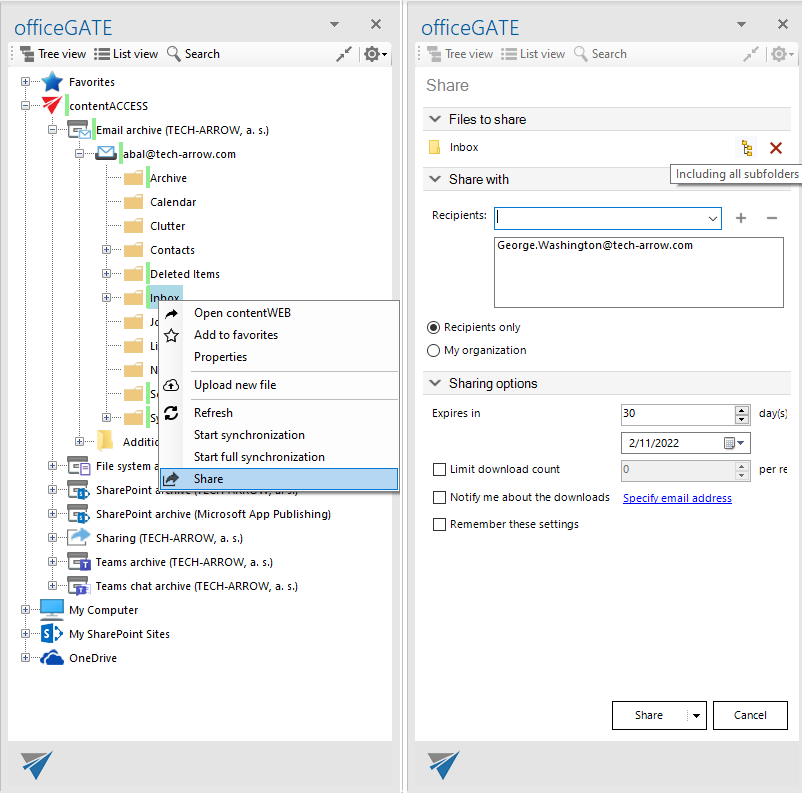
<p><strong>✓ Folder sharing</strong></p>
<p>In contentACCESS 5.1, we introduced the folder sharing feature. Now, this feature is also available in officeGATE, allowing you to share folders and even entire structures. officeGATE provides the same options as contentWEB, including the ability to share folders recursively.</p>
<p><img decoding="async" loading="lazy" alt="officeGATE folder sharing" src="https://docs.tech-arrow.com/assets/images/eros-og-folder-sharing-6313b435ac809fadaee504a0f6936481.png" width="802" height="793" class="img_ev3q"></p>
<p><strong>✓ Download notification</strong></p>
<p>The new download notification feature is also available in officeGATE. To use this feature, officeGATE must be connected to contentACCESS 5.2 or later.</p>
<h2 class="anchor anchorTargetStickyNavbar_Vzrq" id="common">Common<a href="https://docs.tech-arrow.com/release/officegate/officegate-5-2#common" class="hash-link" aria-label="Direct link to Common" title="Direct link to Common" translate="no">​</a></h2>
<p><strong>✓ TLS 1.2</strong></p>
<p>In this version, the TLS versions available for officeGATE are explicitly specified. Previously, these options were defined by the operating system and the .NET framework, which in most cases allowed only TLS 1.0. Now, the TLS versions are explicitly specified, forcing officeGATE to use TLS 1.2 or TLS 1.3, if available.</p>
<p><strong>✓ Performance and stability fixes</strong></p>
<p>Improvements were made to make the system faster and more stable, ensuring a better contentACCESS experience than ever before.</p>]]></content>
        <author>
            <name>Attila Balázsy</name>
        </author>
        <category label="officeGATE" term="officeGATE"/>
        <category label="Release" term="Release"/>
    </entry>
    <entry>
        <title type="html"><![CDATA[officeGATE Version 5.1]]></title>
        <id>https://docs.tech-arrow.com/release/officegate/officegate-5-1</id>
        <link href="https://docs.tech-arrow.com/release/officegate/officegate-5-1"/>
        <updated>2021-08-13T00:00:00.000Z</updated>
        <summary type="html"><![CDATA[✨ Highlights]]></summary>
        <content type="html"><![CDATA[<h2 class="anchor anchorTargetStickyNavbar_Vzrq" id="-highlights">✨ Highlights<a href="https://docs.tech-arrow.com/release/officegate/officegate-5-1#-highlights" class="hash-link" aria-label="Direct link to ✨ Highlights" title="Direct link to ✨ Highlights" translate="no">​</a></h2>
<ul>
<li class="">Added a basic view of folder sharing, allowing users to see shared folders and modify their sharing parameters.</li>
<li class="">Ended support for the Lexmark fileNshare connector to focus on more valuable integrations.</li>
<li class="">Improved overall performance and stability.</li>
</ul>
<h2 class="anchor anchorTargetStickyNavbar_Vzrq" id="sharing">Sharing<a href="https://docs.tech-arrow.com/release/officegate/officegate-5-1#sharing" class="hash-link" aria-label="Direct link to Sharing" title="Direct link to Sharing" translate="no">​</a></h2>
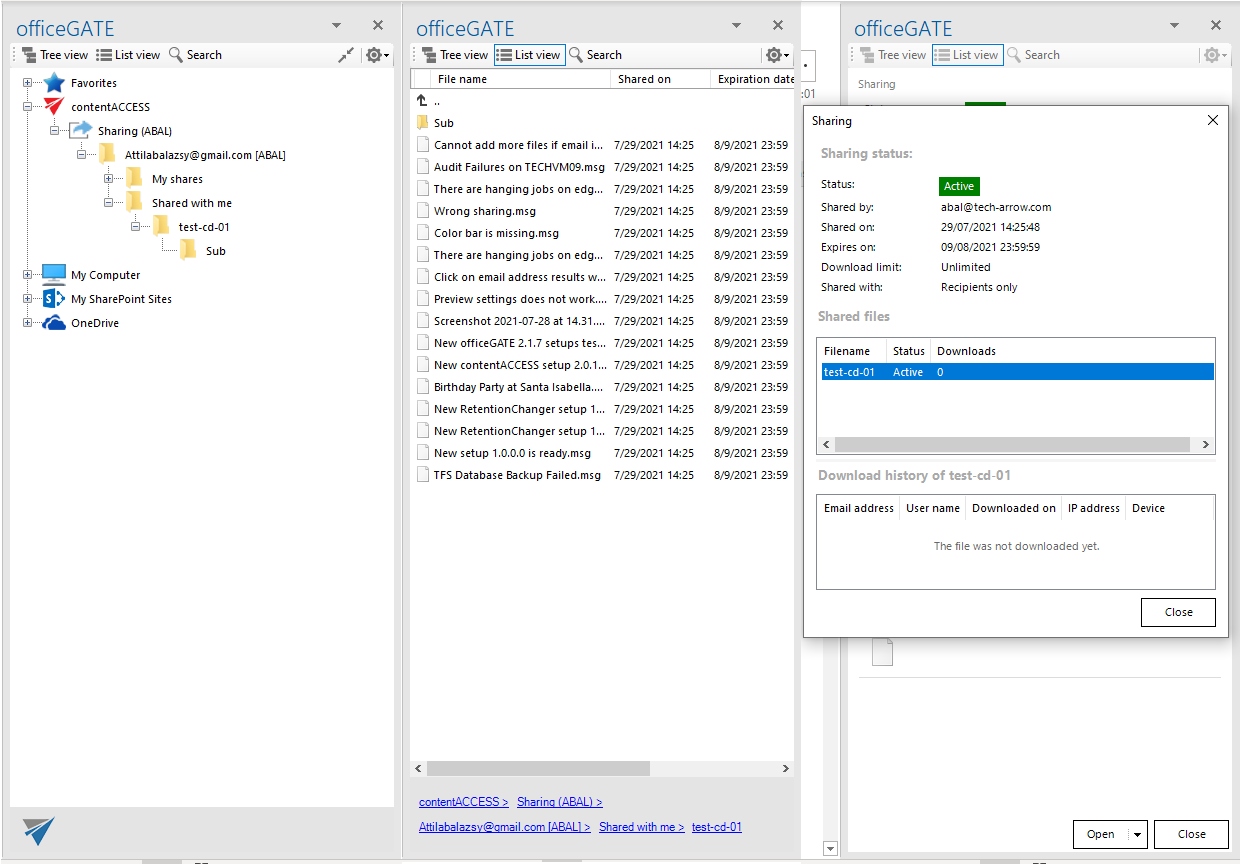
<p><strong>✓ Basic view of folder shares</strong></p>
<p>We added a basic view of folder sharing to officeGATE. In this version, users can see all shared folders and modify the sharing parameters of a shared folder. We are now working to make sharing fully available across officeGATE.</p>
<p><img decoding="async" loading="lazy" alt="officeGATE folder sharing" src="https://docs.tech-arrow.com/assets/images/og-folder-sharing-3cd38f65a49999dda81d96b105b66793.png" width="1240" height="865" class="img_ev3q"></p>
<h2 class="anchor anchorTargetStickyNavbar_Vzrq" id="common">Common<a href="https://docs.tech-arrow.com/release/officegate/officegate-5-1#common" class="hash-link" aria-label="Direct link to Common" title="Direct link to Common" translate="no">​</a></h2>
<p><strong>✓ fileNshare support ended</strong></p>
<p>To focus on more valuable connectors, we decided to end support for Lexmark fileNshare. The connector has already been removed from officeGATE.</p>
<p><strong>✓ Performance and stability fixes</strong></p>
<p>Improvements were made to increase system speed and stability, so your contentACCESS experience can be better than ever before.</p>]]></content>
        <author>
            <name>Attila Balázsy</name>
        </author>
        <category label="officeGATE" term="officeGATE"/>
        <category label="Release" term="Release"/>
    </entry>
    <entry>
        <title type="html"><![CDATA[officeGATE Version 5.0]]></title>
        <id>https://docs.tech-arrow.com/release/officegate/officegate-5-0</id>
        <link href="https://docs.tech-arrow.com/release/officegate/officegate-5-0"/>
        <updated>2021-04-16T00:00:00.000Z</updated>
        <summary type="html"><![CDATA[✨ Highlights]]></summary>
        <content type="html"><![CDATA[<h2 class="anchor anchorTargetStickyNavbar_Vzrq" id="-highlights">✨ Highlights<a href="https://docs.tech-arrow.com/release/officegate/officegate-5-0#-highlights" class="hash-link" aria-label="Direct link to ✨ Highlights" title="Direct link to ✨ Highlights" translate="no">​</a></h2>
<ul>
<li class="">Share items directly from the archive using secure sharing links, including support for drag &amp; drop of archived items and file archive shortcuts.</li>
<li class="">Improved Drag &amp; Drop experience with smoother handling of large files, progress indication, and the ability to cancel operations.</li>
<li class="">New SharePoint proxy integration for SharePoint and OneDrive for Business, enabling faster sharing without duplicating content.</li>
<li class="">Support for Office 365 Hub Sites, allowing direct access, browsing, and searching of associated SharePoint sites.</li>
<li class="">Enhanced visibility of the logged-on user in contentACCESS, along with overall performance and stability improvements.</li>
</ul>
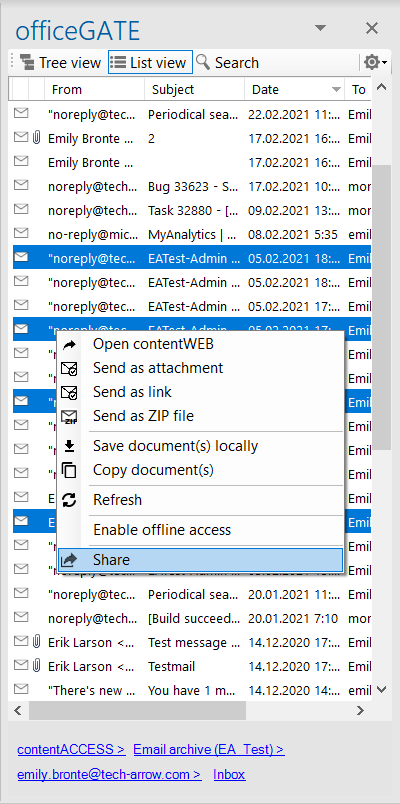
<p><strong>✓ Share from archive</strong></p>
<p>Don’t send large attachments anymore—simply select the desired items and click the Share option. This creates a sharing link pointing to the items, saving time and storage space while making the process more secure. You can also drag and drop an archived or shortcutted item directly from your mailbox. contentACCESS sharing will recognize it and share the existing email from the archive.</p>
<p>Would you like to have this functionality for file archive shortcuts (lnk files)? No worries—it is already available. Just drag and drop a file archive shortcut into the sharing dialog, and contentACCESS will recognize it.</p>
<p><img decoding="async" loading="lazy" src="https://docs.tech-arrow.com/assets/images/CASTOR_08-c48fff574840328f5eac5ce790d9a57a.png" width="400" height="804" class="img_ev3q"></p>
<p><strong>✓ SharePoint proxy integration for SharePoint and OneDrive for Business</strong></p>
<p>When sharing live SharePoint items or items from OneDrive, and a SharePoint proxy is configured, only the document reference will be shared. The shared item itself is not duplicated into contentACCESS, which makes the process much faster. contentACCESS still provides all standard sharing features, including auditing, retention control, and more.</p>
<p><strong>✓ Drag&amp;Drop</strong></p>
<p>The Drag &amp; Drop process is now much smoother, especially when dragging larger files. A progress bar shows how much of the process remains, and the operation can be canceled at any time.</p>
<p><strong>✓ Logged-on user for contentACCESS</strong></p>
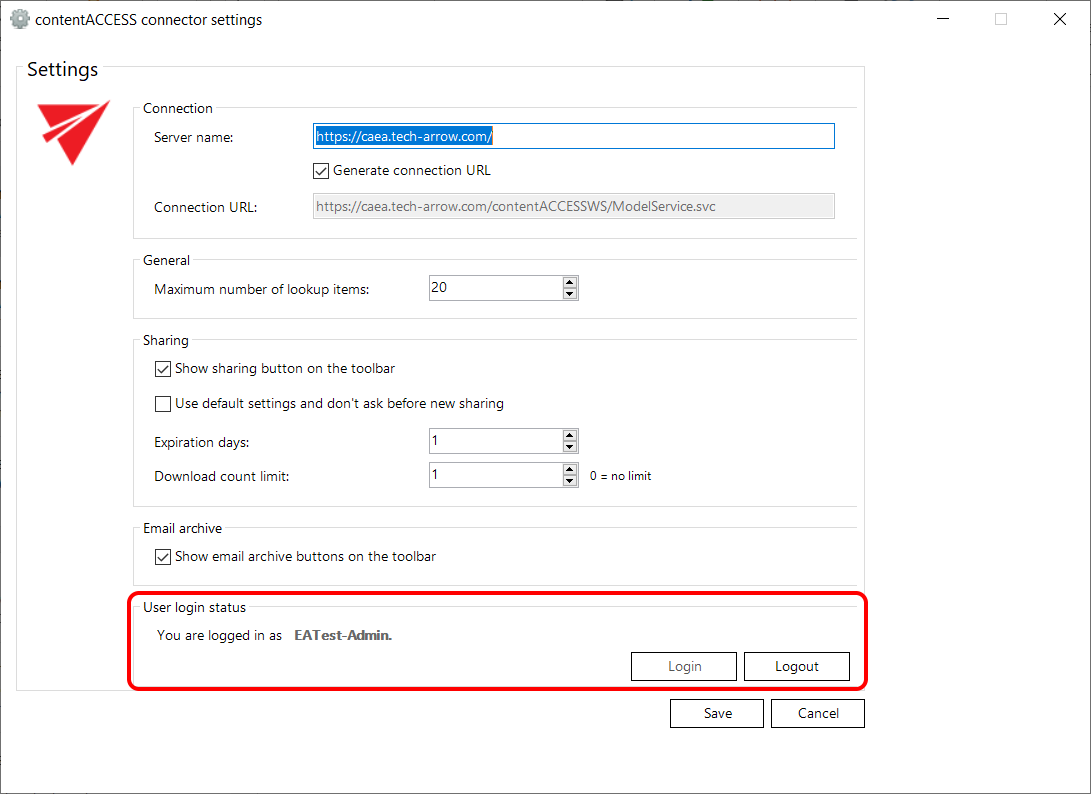
<p>A new section has been added to the contentACCESS provider settings, where you can now see the currently logged-on user.</p>
<p><img decoding="async" loading="lazy" src="https://docs.tech-arrow.com/assets/images/CASTOR_09-180914894b7b89dda2b3007e49ab4f0d.png" width="1091" height="794" class="img_ev3q"></p>
<p><strong>✓ Office 365 Hub Site support</strong></p>
<p>Hub Sites are a modern SharePoint Online feature for improved site structure and organization within a company. officeGATE now supports Hub Sites, allowing you to connect directly from officeGATE and browse or search the associated sites.</p>
<p><strong>✓ Performance and stability fixes</strong></p>
<p>Improvements were made to make the system faster and more stable, providing an even better officeGATE experience.</p>
<h2 class="anchor anchorTargetStickyNavbar_Vzrq" id="update-from-older-versions">Update from older versions<a href="https://docs.tech-arrow.com/release/officegate/officegate-5-0#update-from-older-versions" class="hash-link" aria-label="Direct link to Update from older versions" title="Direct link to Update from older versions" translate="no">​</a></h2>
<p><strong>✓ Update path:</strong> Updating from older versions of officeGATE is supported.</p>
<p><strong>✓ .NET Framework support:</strong> The minimum required .NET Framework version was increased for officeGATE 4.1 from .NET 4.5 to .NET 4.8.</p>]]></content>
        <author>
            <name>Attila Balázsy</name>
        </author>
        <category label="officeGATE" term="officeGATE"/>
        <category label="Release" term="Release"/>
    </entry>
    <entry>
        <title type="html"><![CDATA[officeGATE Version 4.1]]></title>
        <id>https://docs.tech-arrow.com/release/officegate/officegate-4-1</id>
        <link href="https://docs.tech-arrow.com/release/officegate/officegate-4-1"/>
        <updated>2020-08-03T00:00:00.000Z</updated>
        <summary type="html"><![CDATA[✨ Highlights]]></summary>
        <content type="html"><![CDATA[<h2 class="anchor anchorTargetStickyNavbar_Vzrq" id="-highlights">✨ Highlights<a href="https://docs.tech-arrow.com/release/officegate/officegate-4-1#-highlights" class="hash-link" aria-label="Direct link to ✨ Highlights" title="Direct link to ✨ Highlights" translate="no">​</a></h2>
<ul>
<li class="">Added SharePoint modern authentication using Microsoft online authentication, supporting advanced security features such as multi-factor authentication.</li>
<li class="">Introduced an updated time selector for SharePoint items, with 30-minute intervals, custom time entry, and improved default time handling.</li>
<li class="">Updated the OneDrive provider to use the latest Microsoft Graph API for improved performance.</li>
<li class="">Added support for generating and copying OneDrive sharing links directly from the context menu.</li>
</ul>
<p><strong>✓ SharePoint modern authentication</strong></p>
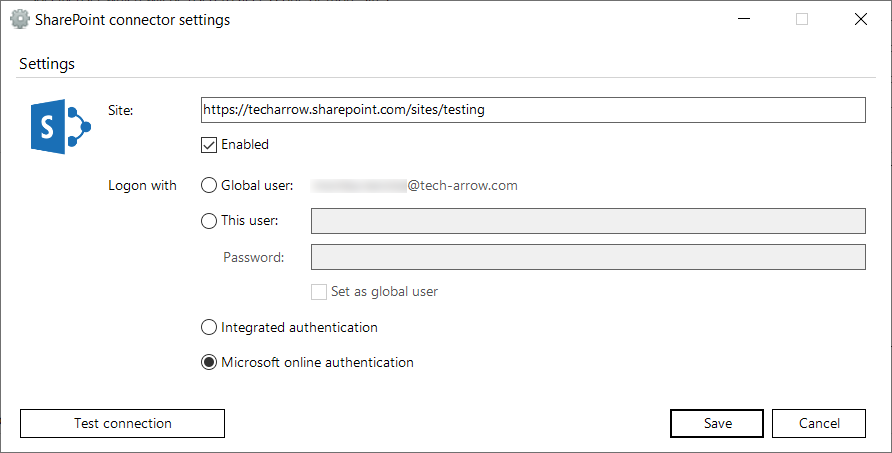
<p>A new authentication option has been added – <strong>Microsoft online authentication</strong>. By selecting this option, you will be authenticated using the <strong>Modern authentication</strong>, which supports all security features of Microsoft authentication, like multi-factor authentication.</p>
<p><img decoding="async" loading="lazy" src="https://docs.tech-arrow.com/assets/images/4_1_og_01-871ebfb55ebd2c3b939faf65a3bf1a44.png" width="892" height="453" class="img_ev3q"></p>
<p><strong>✓ Updated time selector</strong></p>
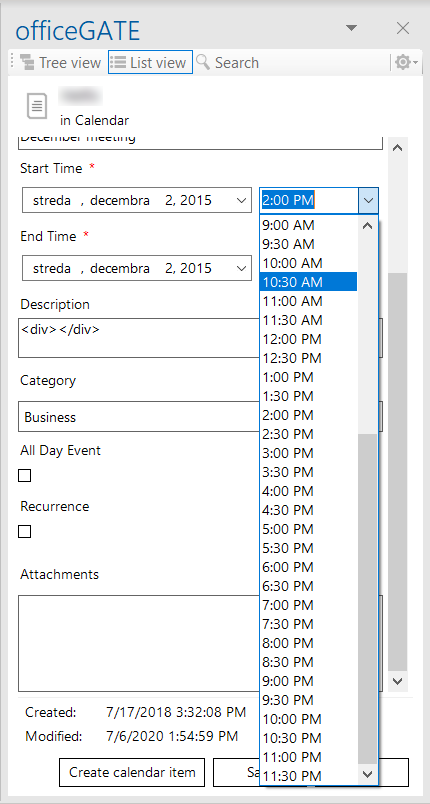
<p>When managing SharePoint items where it is possible to specify time, you can now pick the time from the dropdown list. Times are listed by 30 minutes and you can also specify custom time (e.g. 10:37 AM). When creating a new item, the date and time field are using the current values, but the time is rounded up to the next 30 minutes.</p>
<p><img decoding="async" loading="lazy" src="https://docs.tech-arrow.com/assets/images/4_1_og_02-bf02b1468cdcc76a8635e06591265833.png" width="430" height="804" class="img_ev3q"></p>
<p><strong>✓ Updated OneDrive provider</strong></p>
<p>OneDrive provider code has been updated to use the latest version of the Microsoft Graph API, thanks to which it is working super-fast now.</p>
<p><strong>✓ OneDrive provider sharing link</strong></p>
<p>The possibility to copy OneDrive link to share an item has been added to the context menu options. The generated sharing link is the same as what is generated by the official OneDrive client.</p>
<h2 class="anchor anchorTargetStickyNavbar_Vzrq" id="update-from-older-versions">Update from older versions<a href="https://docs.tech-arrow.com/release/officegate/officegate-4-1#update-from-older-versions" class="hash-link" aria-label="Direct link to Update from older versions" title="Direct link to Update from older versions" translate="no">​</a></h2>
<p><strong>✓ Update path:</strong> Update from older versions of officeGATE is supported.</p>
<p><strong>✓ .NET Framework support:</strong> The minimum required .NET Framework version was increased for officeGATE 4.1 from .NET 4.5 to .NET 4.8.</p>]]></content>
        <author>
            <name>Attila Balázsy</name>
        </author>
        <category label="officeGATE" term="officeGATE"/>
        <category label="Release" term="Release"/>
    </entry>
    <entry>
        <title type="html"><![CDATA[officeGATE Version 4.0]]></title>
        <id>https://docs.tech-arrow.com/release/officegate/officegate-4-0</id>
        <link href="https://docs.tech-arrow.com/release/officegate/officegate-4-0"/>
        <updated>2020-06-01T00:00:00.000Z</updated>
        <summary type="html"><![CDATA[✨ Highlights]]></summary>
        <content type="html"><![CDATA[<h2 class="anchor anchorTargetStickyNavbar_Vzrq" id="-highlights">✨ Highlights<a href="https://docs.tech-arrow.com/release/officegate/officegate-4-0#-highlights" class="hash-link" aria-label="Direct link to ✨ Highlights" title="Direct link to ✨ Highlights" translate="no">​</a></h2>
<ul>
<li class="">Manage SharePoint item check-in and check-out directly in officeGATE, including visibility of status and the user who has an item checked out.</li>
<li class="">Create new SharePoint items directly from officeGATE, with support for library templates and content types, matching SharePoint’s new item options.</li>
<li class="">Automatically create and synchronize Outlook (Exchange) calendar entries from SharePoint calendar items, including notifications and participant invitations.</li>
<li class="">Preview contentACCESS items without downloading them, with direct access to item text and attachments, and a new preview window on double-click.</li>
</ul>
<p><strong>✓ Check-in management</strong></p>
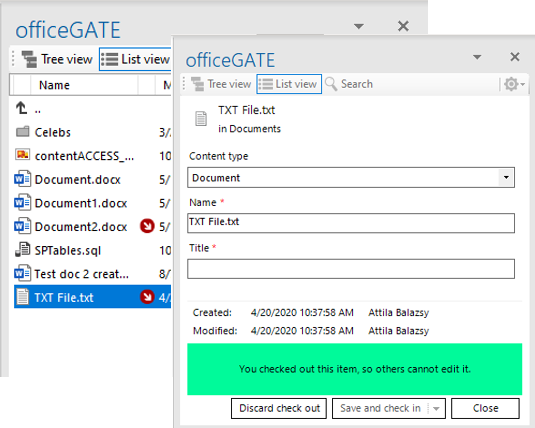
<p>From now on, you will be able to see and manage a SharePoint item’s check-in/check-out status. officeGATE will inform you if an item is checked out and by whom. You will also be able to check out or check in a document directly in officeGATE.</p>
<p><img decoding="async" loading="lazy" src="https://docs.tech-arrow.com/assets/images/check-in-2fbe63a919210c5b1e9cf6dbbe778f79.png" width="535" height="428" class="img_ev3q"></p>
<p><strong>✓ Creating new item</strong></p>
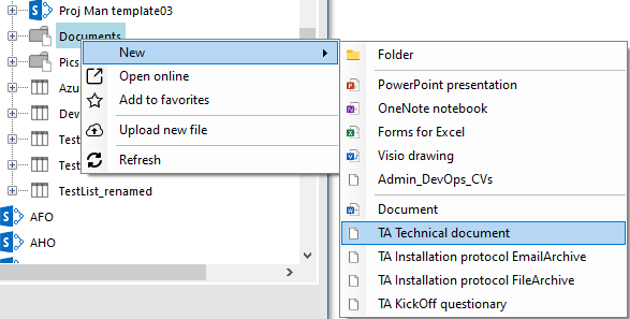
<p>Previously, officeGATE allowed uploading existing items to SharePoint. In the new version, we have extended this functionality to also allow creating new items. New item creation supports library templates and content type templates. All options available in SharePoint’s new item creation menu are also available in officeGATE.</p>
<p><img decoding="async" loading="lazy" src="https://docs.tech-arrow.com/assets/images/newItemCreation-84ba7f161f11adbc229ca5ef4368dedb.png" width="630" height="319" class="img_ev3q"></p>
<p><strong>✓ Creating Outlook calendar entry</strong></p>
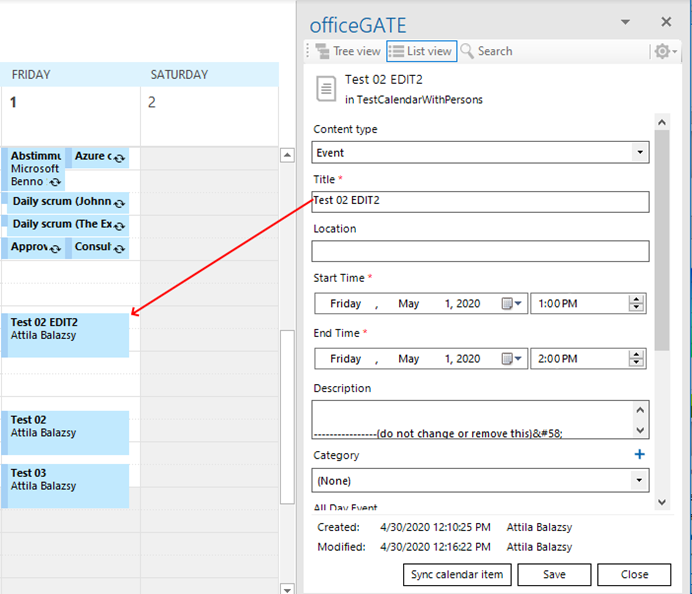
<p>Calendars in SharePoint have fewer features compared to calendars in Exchange. officeGATE fills this gap by (optionally) creating calendar entries in Exchange based on the SharePoint item. These entries are kept in sync, and modifications are synchronized between both systems. The created Exchange calendar entry is sent to participants and includes all standard features, such as notifications.</p>
<p><img decoding="async" loading="lazy" src="https://docs.tech-arrow.com/assets/images/CalendarEntryCreation-b605a0da728d94928e171b27c98d1039.png" width="692" height="594" class="img_ev3q"></p>
<p><strong>✓ contentACCESS item preview</strong></p>
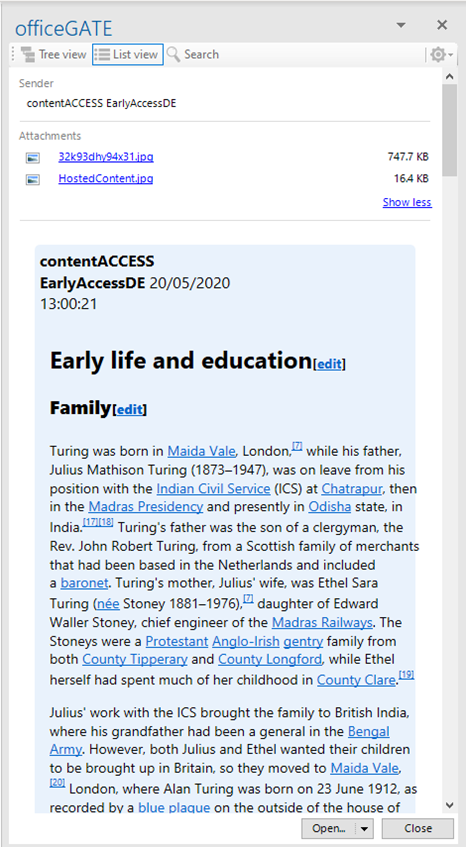
<p>The new contentACCESS item preview eliminates the need to download large emails from the server just to access text from the email body or preview a conversion in a Teams archive. The preview provides direct access to the textual content of the item as well as its attachments. Attachments can be saved or attached to a new email. Double-clicking an item in the contentACCESS provider will now open the new preview window instead of downloading the item.</p>
<p><img decoding="async" loading="lazy" src="https://docs.tech-arrow.com/assets/images/caPreview-ace1931278d3e4f708c64f23438e6d34.png" width="466" height="847" class="img_ev3q"></p>]]></content>
        <author>
            <name>Attila Balázsy</name>
        </author>
        <category label="officeGATE" term="officeGATE"/>
        <category label="Release" term="Release"/>
    </entry>
    <entry>
        <title type="html"><![CDATA[officeGATE Version 3.9]]></title>
        <id>https://docs.tech-arrow.com/release/officegate/officegate-3-9</id>
        <link href="https://docs.tech-arrow.com/release/officegate/officegate-3-9"/>
        <updated>2019-11-11T00:00:00.000Z</updated>
        <summary type="html"><![CDATA[✨ Highlights]]></summary>
        <content type="html"><![CDATA[<h2 class="anchor anchorTargetStickyNavbar_Vzrq" id="-highlights">✨ Highlights<a href="https://docs.tech-arrow.com/release/officegate/officegate-3-9#-highlights" class="hash-link" aria-label="Direct link to ✨ Highlights" title="Direct link to ✨ Highlights" translate="no">​</a></h2>
<ul>
<li class="">Manage SharePoint list items directly in Outlook, including creating items, adding attachments via drag and drop, and sending list items by email.</li>
<li class="">Create lookup items directly during list item creation, a capability not available in SharePoint itself.</li>
<li class="">Edit document and document set library properties directly from the items view.</li>
<li class="">Benefit from significantly faster loading of the SharePoint provider in the tree view.</li>
<li class="">Use the new EIM integration to deploy templates, send officeGATE invitations, and manage SharePoint files directly from Outlook.</li>
</ul>
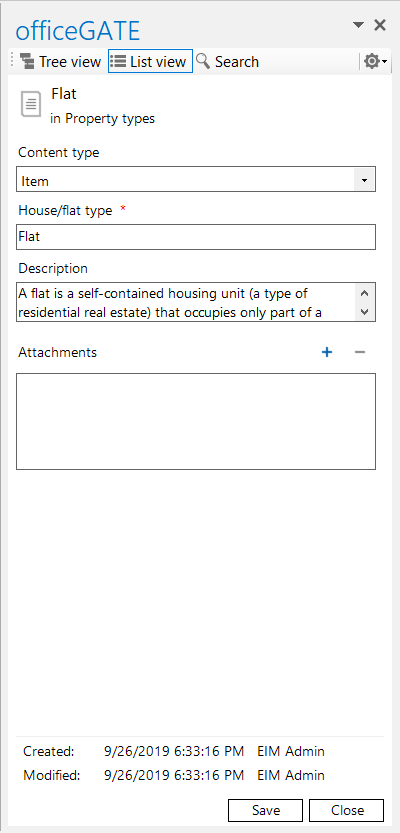
<p><strong>✓ List item management:</strong> From now on, you will be able to manage your list items directly in Outlook, too! Create new list items, add attachments with simple drag and drop, or even drag whole list items into an email, saving even more time than before.</p>
<p><img decoding="async" loading="lazy" src="https://docs.tech-arrow.com/assets/images/officeGATE-list-item-management-cbf8d7076bec9891f6e1e0ac195238b2.png" width="400" height="833" class="img_ev3q"></p>
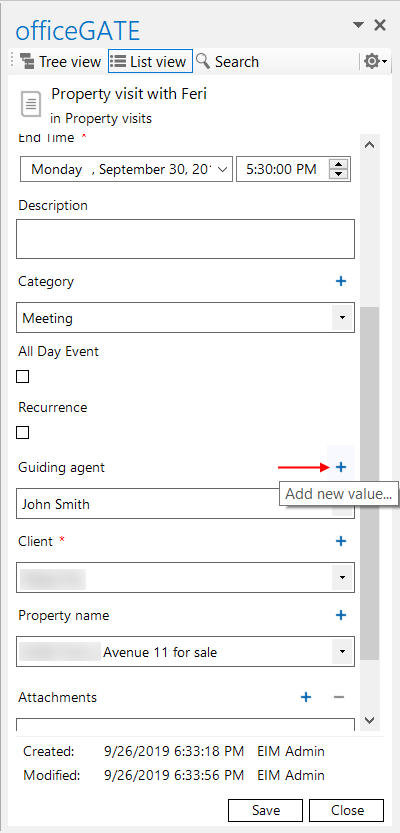
<p><strong>✓ Creating lookup items directly from list item creation:</strong> Create lookup items directly during item list creation. This feature is not even available in SharePoint, making officeGATE an excellent tool for increasing your productivity.</p>
<p><img decoding="async" loading="lazy" src="https://docs.tech-arrow.com/assets/images/officeGATE-lookup-items-1bf372a9bd640244b26ed648d013b37c.png" width="400" height="833" class="img_ev3q"></p>
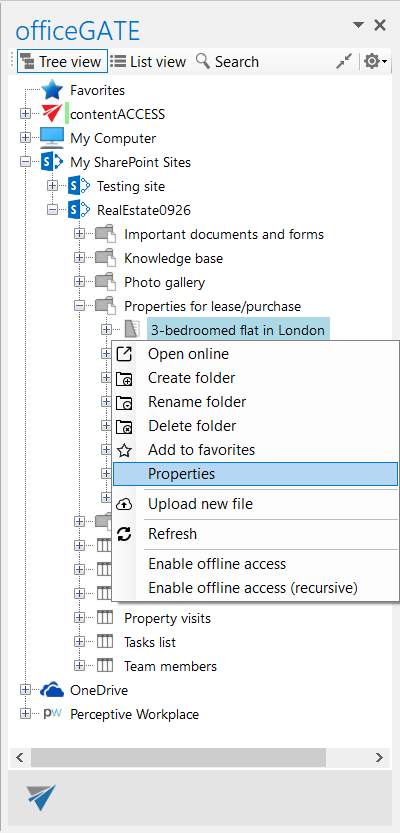
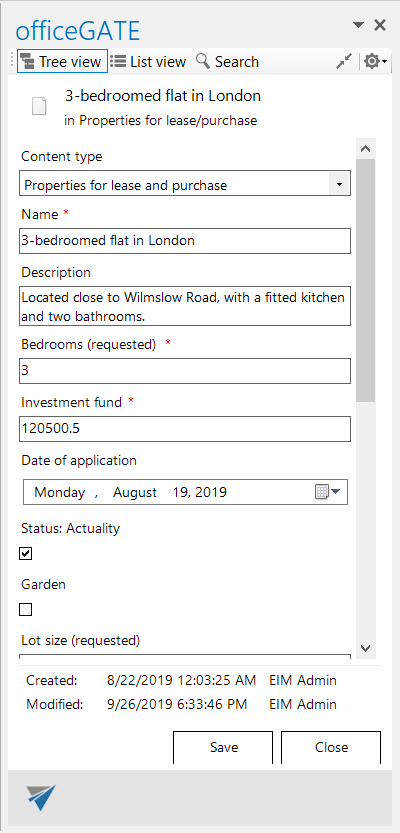
<p><strong>✓ Edit documents and document set libraries:</strong> officeGATE previously only displayed properties in the items view—now it is enriched with the option to edit them as well.</p>
<p><img decoding="async" loading="lazy" src="https://docs.tech-arrow.com/assets/images/officeGATE-edit-documents-libraries1-3be77fd2b412af0459fe9b917691fb47.png" width="400" height="833" class="img_ev3q">&nbsp; &nbsp; &nbsp; &nbsp; &nbsp; <img decoding="async" loading="lazy" src="https://docs.tech-arrow.com/assets/images/officeGATE-edit-documents-libraries2-01a9ea43edd71972e3d00b4ea48bfdfb.png" width="400" height="833" class="img_ev3q"></p>
<p><strong>✓ Faster loading:</strong> Since SharePoint is becoming the preferred solution for many users, we wanted to give it a boost as well. The SharePoint provider now loads much faster in the tree view.</p>
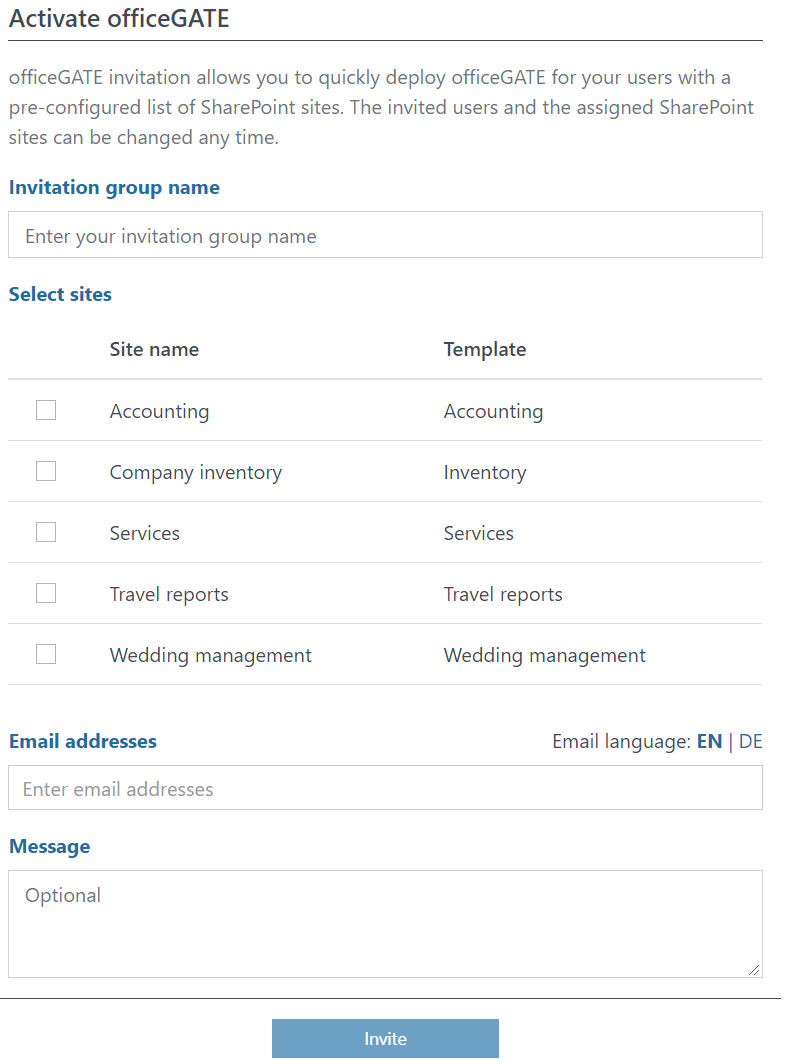
<p><strong>✓ EIM integration:</strong> EIM allows users to manage, activate, and deploy their templates to SharePoint sites. Thanks to the integration, officeGATE invitations with a pre-configured list of SharePoint sites can be sent directly from EIM by the customer administrator to end users. End users can then manage their files stored in SharePoint directly from Outlook.</p>
<p><img decoding="async" loading="lazy" src="https://docs.tech-arrow.com/assets/images/officeGATE-EIM-integration-ccf22c9223e75175242cc05d78bddd10.png" width="789" height="1064" class="img_ev3q"></p>
<p><strong>✓ Stability and performance improvements:</strong> A lot of stability and performance improvements were made for a much faster and smoother officeGATE experience.</p>]]></content>
        <author>
            <name>Attila Balázsy</name>
        </author>
        <category label="officeGATE" term="officeGATE"/>
        <category label="Release" term="Release"/>
    </entry>
    <entry>
        <title type="html"><![CDATA[officeGATE Version 3.2]]></title>
        <id>https://docs.tech-arrow.com/release/officegate/officegate-3-2</id>
        <link href="https://docs.tech-arrow.com/release/officegate/officegate-3-2"/>
        <updated>2019-03-07T00:00:00.000Z</updated>
        <summary type="html"><![CDATA[✨ Highlights]]></summary>
        <content type="html"><![CDATA[<h2 class="anchor anchorTargetStickyNavbar_Vzrq" id="-highlights">✨ Highlights<a href="https://docs.tech-arrow.com/release/officegate/officegate-3-2#-highlights" class="hash-link" aria-label="Direct link to ✨ Highlights" title="Direct link to ✨ Highlights" translate="no">​</a></h2>
<ul>
<li class="">Added new language support for Slovak, Czech, Hungarian, and Polish, bringing officeGATE closer to more customers.</li>
<li class="">Introduced extended email archive filtering options for more precise searches and faster access to relevant emails.</li>
<li class="">Improved Offline synchronization performance for faster and smoother operation (requires contentACCESS 3.7 or newer on the backend).</li>
</ul>
<p><strong>✓ New languages:</strong> We want to be as close to our customers as possible. That’s why we are continuously adding new languages to our apps. The latest version of officeGATE is enriched with Slovak, Czech, Hungarian, and Polish languages.</p>
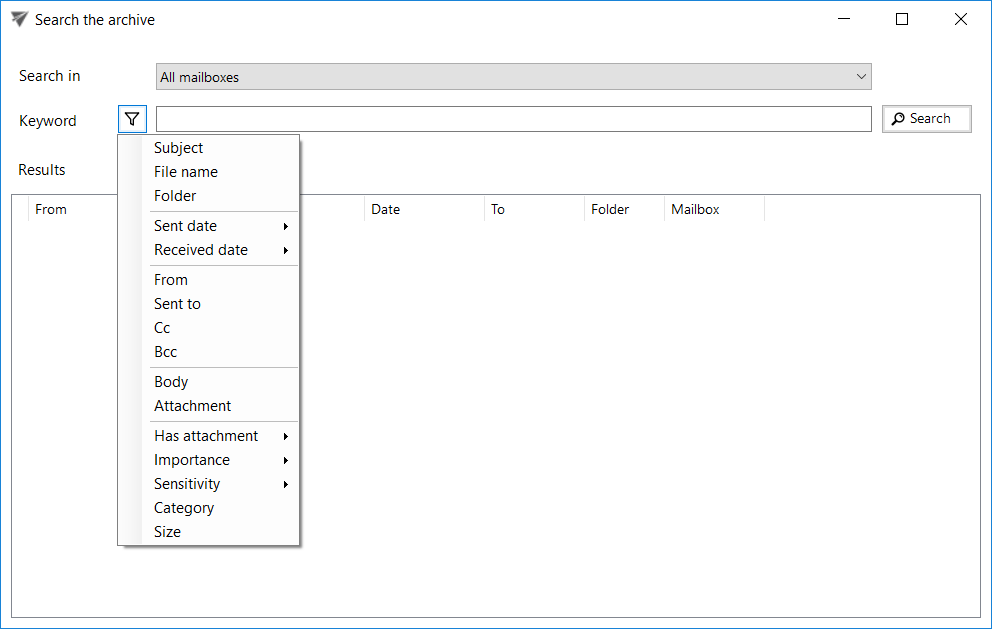
<p><strong>✓ Extended email archive filters:</strong> New filtering options were added to the email archive. This allows you to specify your filtering options more precisely and find the necessary emails more quickly.</p>
<p><img decoding="async" loading="lazy" src="https://docs.tech-arrow.com/assets/images/filters_officeGATE-6b77ddd2a38982672c06c1be70de34f6.png" width="992" height="629" class="img_ev3q"></p>
<p><strong>✓ Improved performance of Offline synchronization:</strong> The performance of Offline synchronization was enhanced to work much faster and smoother. For this feature to work correctly, contentACCESS 3.7 or newer is required on the backend.</p>]]></content>
        <author>
            <name>Attila Balázsy</name>
        </author>
        <category label="officeGATE" term="officeGATE"/>
        <category label="Release" term="Release"/>
    </entry>
    <entry>
        <title type="html"><![CDATA[officeGATE Version 3.1]]></title>
        <id>https://docs.tech-arrow.com/release/officegate/officegate-3-1</id>
        <link href="https://docs.tech-arrow.com/release/officegate/officegate-3-1"/>
        <updated>2018-11-07T00:00:00.000Z</updated>
        <summary type="html"><![CDATA[✨ Highlights]]></summary>
        <content type="html"><![CDATA[<h2 class="anchor anchorTargetStickyNavbar_Vzrq" id="-highlights">✨ Highlights<a href="https://docs.tech-arrow.com/release/officegate/officegate-3-1#-highlights" class="hash-link" aria-label="Direct link to ✨ Highlights" title="Direct link to ✨ Highlights" translate="no">​</a></h2>
<ul>
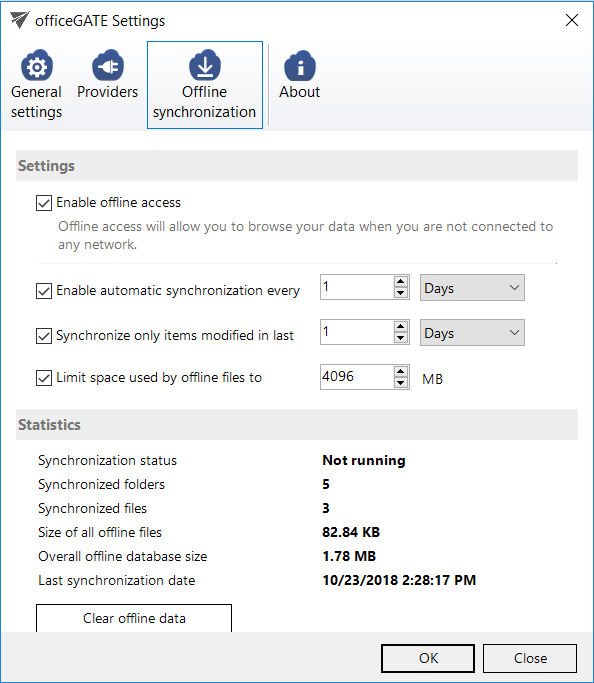
<li class="">Introduced offline cache limits by size and file age to prevent disk overuse and improve overall performance.</li>
<li class="">Improved SharePoint browsing speed with on-demand connections and cached first-level connections.</li>
<li class="">Added greater control for administrators and users over which interface buttons are displayed.</li>
</ul>
<p><strong>✓ Offline cache limitation for date and size:</strong> Do not overfill your disk with unnecessary files—limit the space used by offline files and set an age filter for offline files that can be synchronized. This makes the officeGATE experience faster and smoother.</p>
<p><img decoding="async" loading="lazy" src="https://docs.tech-arrow.com/assets/images/Offline_oG_v2-6cb8eb028837434784760e3b966f152e.png" width="594" height="683" class="img_ev3q"></p>
<p><strong>✓ Control over the displayed buttons:</strong> It is now possible to disable the following buttons: <strong>Show/Hide Panel</strong>, <strong>Share with contentACCESS</strong>, and <strong>Email archive buttons</strong> (archive, restore, search). The Show/Hide Panel can be disabled only by the administrator in the configuration file; the other buttons can also be managed by users.</p>
<p><strong>✓ SharePoint browsing performance:</strong> SharePoint servers are now connected only on demand. The first level (connection) is cached when the user connects for the first time, which significantly speeds up loading, as the connection needs to be reloaded only after a refresh.</p>]]></content>
        <author>
            <name>Attila Balázsy</name>
        </author>
        <category label="officeGATE" term="officeGATE"/>
        <category label="Release" term="Release"/>
    </entry>
    <entry>
        <title type="html"><![CDATA[officeGATE Version 3.0]]></title>
        <id>https://docs.tech-arrow.com/release/officegate/officegate-3-0</id>
        <link href="https://docs.tech-arrow.com/release/officegate/officegate-3-0"/>
        <updated>2018-02-08T00:00:00.000Z</updated>
        <summary type="html"><![CDATA[✨ Highlights]]></summary>
        <content type="html"><![CDATA[<h2 class="anchor anchorTargetStickyNavbar_Vzrq" id="-highlights">✨ Highlights<a href="https://docs.tech-arrow.com/release/officegate/officegate-3-0#-highlights" class="hash-link" aria-label="Direct link to ✨ Highlights" title="Direct link to ✨ Highlights" translate="no">​</a></h2>
<ul>
<li class="">Refreshed icon set aligned with third-party providers and operating system file type icons for a more consistent user experience.</li>
<li class="">Enhanced contentACCESS file archive integration, including manual folder creation and drag-and-drop archiving directly from officeGATE.</li>
<li class="">Improved email archive integration with new ribbon buttons, a dedicated email archive search, and better handling of additional mailboxes.</li>
<li class="">Unified view settings between officeGATE and contentWEB to ensure a consistent look and feel across applications.</li>
<li class="">Extended offline capabilities, allowing email archive shortcuts to be opened directly from the offline cache when available.</li>
</ul>
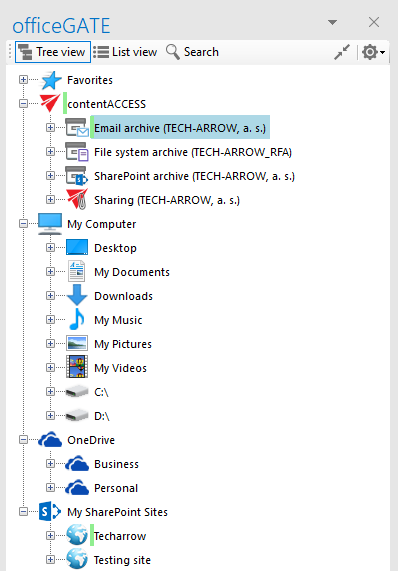
<p><strong>✓ New icon set:</strong> We have updated the icon set in officeGATE to correspond with the icons used by third-party providers. As part of this change, file item icons are now read from the operating system. This ensures that users see the same file type icons in officeGATE as they do in Windows Explorer.</p>
<p><img decoding="async" loading="lazy" src="https://docs.tech-arrow.com/assets/images/NewIcons-27fde7206a06fd8a25674a10c11399f7.png" width="398" height="571" class="img_ev3q"></p>
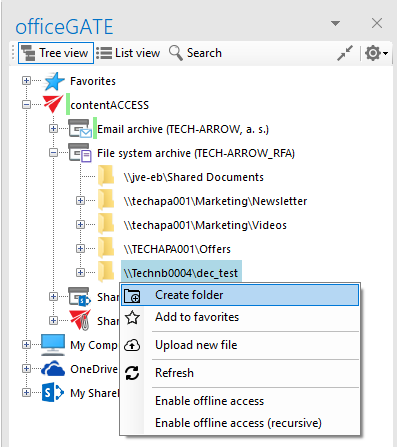
<p><strong>✓</strong> <strong>Manual folder creation in contentACCESS file archive:</strong> officeGATE now allows users to create folders directly in the contentACCESS file archive. This enables end users to better organize their data.</p>
<p><img decoding="async" loading="lazy" src="https://docs.tech-arrow.com/assets/images/FS_Folder-d50143b73da3f8c3bbeb343449b3aa62.png" width="397" height="447" class="img_ev3q"></p>
<p><strong>✓ Drag &amp; drop to contentACCESS file archive:</strong> In previous versions, the contentACCESS file archive was only a read-only view for users in officeGATE. In this version, we have added the ability to drag and drop files from officeGATE directly into the contentACCESS file archive. Together with the manual folder creation feature, this allows end users to archive and organize files directly from officeGATE and use it as an easy-to-manage and powerful file archive.</p>
<p><strong>✓</strong> <strong>Centralized contentACCESS item views:</strong> We have unified the view settings in officeGATE with the contentWEB view settings. Users will now see the same item view in officeGATE as the view configured in contentWEB. This helps ensure a very similar user experience in both applications.</p>
<p><strong>✓</strong> <strong>Opening email archive shortcuts offline:</strong> officeGATE already has a built-in offline feature that allows end users to synchronize online data and make it available offline. In this version, we have extended this functionality by allowing officeGATE to handle contentACCESS email archive shortcuts and open them directly from its offline cache, if the email is available there. This gives users full email archive transparency even in offline mode. This feature requires the latest contentACCESS 3.4 Outlook forms to be installed.</p>
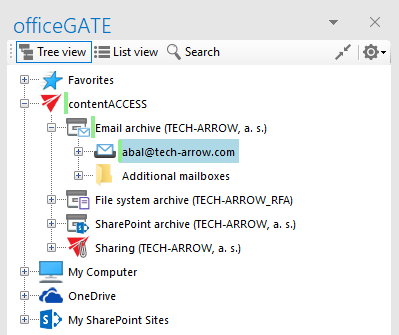
<p><strong>✓</strong> <strong>Email archive additional mailboxes:</strong> Many users have access to multiple mailboxes that are also mirrored to archive mailboxes. In previous versions, it was sometimes difficult to find the primary mailbox in the list of available mailboxes. To address this, officeGATE now collects additional mailboxes in a separate subfolder under Email archive and keeps the primary mailbox one level higher in the tree. This helps end users focus more easily on their own mailbox.</p>
<p><img decoding="async" loading="lazy" src="https://docs.tech-arrow.com/assets/images/EA_AdditionalMailboxes-45ddf67214d6e7f557fd7eaf8f215386.png" width="399" height="335" class="img_ev3q"></p>
<p><strong>✓ Email archive integration improvement:</strong> To provide better integration with the contentACCESS email archive, we have added three new ribbon buttons that allow end users to perform the most commonly used email archive tasks with a single click. These buttons allow users to archive or restore items directly, or to search the email archive.</p>
<p><img decoding="async" loading="lazy" src="data:image/png;base64,iVBORw0KGgoAAAANSUhEUgAAANgAAACeCAIAAADfQ1PLAAAWXElEQVR42uyd+29TZRjHT+Pf4A2iMYuSaGK8/GDiD0b9C/zBX/AWE7uW1jK6ztvQiESdbCpiFqYYwGxgAr2s6yjdWAeyrl0Zg7Fx2Y0EgYGMyxicBH/Wr33JsT1vWw9nZ+tztufJN8t6evb2nPd8zvO8z/O+p1McHxxhsSouhchxsJa5GEQWCTGILBJiEFkkxCCySIhBZJEQg8giIQaRRUIM4hJQVojGwTCIy1B1Aw5/n2Nt713V9tsXRwbRtgpkHJ64471gnkLA0aYsAsQsy36CL3THAJ8swaJxEYnsisOXZNlPnv3/kefq+BfK6oi2xWSbNYcQ3IF4ZUDEcbNsLFAo0Fn3uwWtOcMObxfGnWiTQWTdi97v1q6llc16Ew5/CvF6MUEMsWwozSNG4cAQUhFbtY3zabCgkfcPoOVFGyP2sOwnb1c+MQWJS3U7ALrnBuFZ3Z0OZ0SHI1pG0Idr5PINq7hEvqIXSFp32HxhvOYgcCziIIFpIM0gskpUs+EXXTFkGEAHWTMYAkkWzNP4kmhWco2dQJxBZJVQbT8Kh0AHARRoWtmsN6GP1HjpS+JTGETW4gr+VXaNGBL4U9aDKO4kEqfNIii4Rnkw6oqCUatBxAjDE0dVnXFklVAW0R/w6Ys73i5ganlBOyRcLo0zZ9ETMpU1cTmDgQuzEkTN5YJ9EqfNIijETFQonWHdrCA24i3Lp/hCKG/adCkRazEEF+iWM5g4JngsAFEuYJI4ZxZN1fbnpnZCFoZTJTcO7ZD9IrYv4IpOfwqVehJ9yjItEFLdricHgAbSZuuIwEJO0Z1hONsFuZPcnbh74N5z6VEfiT5lmRMun0yOO2aiuKNgmKmNQ+VyEQaLVh60q0P+CBQySfQpy3QG4+vRh2lnBKO7e4JHyRsOZnXPQEAWBujCQlQof7UIiQ5lzUfwJu5OPTxr9hmfnlYwh5NPtz7qV0cAqCVVqIJMCMcNB6zh6E2QWH9PTTUH7TSSru3HlZUjHk7EGIjumEyM9U7R16MtbdfIzp/HpLHalJicEXQRri6uMQnUDC0kOyRlMCFEWtxRRkHUpCugC5c5T8H/yS4WR0xitT19uTqQ5NnGO/pT8hgPFJWfg1GAnZxV6IkOZCzIVPKHDuDSEydxjW0kVwf6jQRqRip0viTI0Q/zvF2l5mCUYm4/K55N1GTNckt3Z4lkJUJi8T01ISK7onJ9V2QAJGgz4hrdnQYX2CpGlqGjX6y4S9LaoFD37A+JR9apqW4APqL4isDqdttMfQXSOFT5+GWilFJF88I8PG7ZYaFlT1wI3ts+w/CKXkt0lDOsd43uTnv0Xt0AiiT6GIvTwfEHMmVBlHNnd8zaAYQQL60wrCyYw60ru5YFXS1lYXokjl+Oh1oGo5TPLTQQaVyP5S24FkRq+TkSTxxvWVwRRAx0dQB0/BQZhmXHL8/BePbjTmMQ7SZ/CvnKws2UIhjqwijQQfug07oMRk4VYiXHiAwiadUclBaoRizIYKSCyYIwEMjICxuUojVCnNLyWp4o6l6IEa6oPVQclxCC6fyabS+46P5U/uxGwZ7oK18S/WY6TOtcr4JG5eZ0Fayl/PyAvw+RDj0iHlMnUbimIFdMW5ZVEnpnGG+J7ySZ/3eNKiL5KmAxkNZ9qj3KBOZ6wRkhceGpKW9et3gXyQlTIGM2gzmUByJel4rLrigJbixfXeyMsAsskLxSAb3k7jS6vzOCkavp4pQCCvPLRdikvzy+HhLoWKZsbtwTKjKT60tiVIR70q6SiyNiZj+QMd5Iof8L6YO1kD+Fvir6hInpdEJKVqTSwJJ68B49WB2Rw5D4ugv7F9hzdW/5SXgQE0gbHzTLNBdLJLJiyqTIx7ljJsZySrlkGfImaHSxNeEY3bQMnp3NatdROlPj5ZVu3J9C0n8qMPRx+CuTIBareoeXiDvEWXikcOzqsPU/JimrrDS9C4VEmDbYgiZDO/tToEX+OOP8KJovlB3yEnmsCbQV+0qrJXKPlb/91sTlDHeBLqv2Hzfkj+OvpWPZRgwii4QYRBYJMYgsEmIQWSTEILJIiEFkkRCDyCIhBpFFQgwii4QYRBYJMYgsElLu+/AIi1VxKSobGwFjENlIGIPIRsIYRDYSxiCStlOnTqnLwxhE0sYgLl+7ffv2rVu3ZmZmRkZGUqlUf39/Op0+d+7c7OwstuNd9a4xiAziQlI4Nzc3MTHR3d09Pj4+MDCQTCZBw+TkZCaTuXbtGlhUNasoiDU1tR9/XF9GdXUfbdrUpNrEKgMirve+fftUegbOpqamAN/hw4e3bt0ai8Xw+/bt25ubm6enp+Edb9y4gYMXe1YWxE8+Wf93zuLxxJ49wfPnL0ATE5M//th84cJFbL9z56/a2g9Um1gFQEwme1evflOlZyDs+vXr0Wh0dHQ0GAxeuXLlZs4A3/Dw8ObNm8+ePTs2NgYEZ8Ptc1NnKwtiff2nAsQdO3Y2Nn6bSHRD7e3R9es/GxkZFW+tXetXbWLlQGxo+AbEWKJ33nlXtCle4nqri2VzFy/ePHXaiK6Pnhw90JPs6Wlr+WmqL3Xl2PCfx45fOjqEn9ODQ7t/+GFoaOhAPP6Hz3/j841omQiIpaw8iKtzphq2VatWnThxIn8LXoqNi+ER54/ghg1fiKYw9tI2qotocxOTs1VP3Vz5+P9qekXVT/evPHP69LdPP5d64JHIisfCr72+d/Xbu156ddC37mQ68+vOnbHGppEnn52bmVHtDCLoeTln+MUEiBUIzRi2m0YwGAxp7bS0tFSEQmGzDU1GQLzwcNX3Dz1yYnj4y0ertrz0ytjx4aNHjvT29qIT4AvDG75ocK/p2r5jvOVnMUysLIhIR9radrW2lpPL5VGLWVOe2QNEc04RI6pSLdTXr1cX3W5dvTb7/ItGQGy6f8X42NhbVU9k+vo2NzbubmtLJBINGzciIu/97vvP3njrYCh0+dIlCiDCIyIdKS8kNGoxE74QlQH8ko9aXV0dfmr7rMoZdhPvtra2ii3AN59O7Im3xBbRpha4YXhpDYgYmxtH8PLly2qeoRqn20GtkN38bY8hj/jgyuFjx7/6fAMc4eDgINKUq/3pzLMveJ95/tL09IceL2qKSGKIgCjibzAY3rbtl6GhYxCKnl9/vQmJv3hry5bmk2f0bkywotGGlxpVTf+wc+4/UVxRHO/fIDZlqTZFrI31kRjT1D5tY2NjTPquohhQtD5CbWsircFEo8a0VK1QQF6NVFkUawGBZYHwXB6Ly6NgQFF3peKKEnaGdfqLSVubftljr9u9eCmysDPrfDOZ3Llzd3Ym+9lzzj33zk1MZBEkoPSxiKikj6PsDSIopFMQPkVQMr+PQ1T6p9e8bl30mAiydIbRmEeFnTvjfdrQnQVEuD3XivfFIPZ/uNqYsBs3mZ9/2mw2A7ihY5muZ+ZcM4QnTnvqQteFpKNHkVkcGBhQFYh5eafS0tIJxPp6y/79By9d6mUg7joSo3iJWGHAoYBDb6qYMRO4ZirzBeKPwUoigv0DothBe2e2EAt6t1eJOSTJDY0PQ9C1aZvc0ITu1M/Z2TCEpaWlJflnej9a4/KcdYbNMoYYKkwmZBOR1labRRQo+6eMjQeX+CLFaeIgJnoE44c9M7qTkkfMzz/jQ1Vc3HZ2du3adajBD4kyMm0CkxlYSVs++w+CM5+TdsTL3T0AS6qzXP94TU5kFEA0mUzGrXEXQ5+VPM0GwiLOTg8rKyxMSUlpaWlRP4j3/v6r8Up+e19ZXNYii7VK8RJzo0w4RKUPasAISP1/EPluOMWU/gSRN4owe3z4SDXR0etRVqE5JMl2hxThSeXMniftPSD39eERpHMlrpUfSItfGSyvNJeVtVitlUglxsRe+hfEW2ERxRFzS0tKkpKSrFar2lwzrx/rvtiQaThcFnk8L12BOOx4NBlVvOGEeRODyIeVPt7ZbzEi63nU1NRSGaOujDDE9TQsgbKaKSRJx7LkQ0fdtwfdsiyfNEpvvA3UpFVRbqdzyO5Ie2sZosAREGM3eYPYfPBbmEkM+sFeqh/EP+/9UXvxRPCMrPDiPS/9JBUVFQIKs7KyFTUJ2Rw5ORUm8L53/iENT+EyV1yfvzh5elhTQ2NNTc3JdTEPQHznXaQSMe4Mi2iz2ZAZUAOIMTEbdu3aLd42bvxU0YjGAWJZmdkbr/XrY71dtibM4fANJ5Lb0txFFCNKS5bKTVbMt5EOfIPDfsOs1GmhcM15RuPxyCi7IZxAlBub8PcrKipSlUUMMolBZIn4Qz5swUKgHs5tTAoxaUVRgeSrdik+gQJE2lyxW9y3bo8MAK54D4cEYkqIoc1m2/7CgrPTn74ZNksCrFu305QcZLbRa66vr0eIooMYABCRFxzVwqELibJWzKHcbGUIYujZdfwEYJILi2VYR6+x5vSQ0I729tQFi66EhrtQGTFvuO83gIg/HoEIry3LMl1TB3GqLSKjKj7+6zHdsW8EqRpJ2z4Hba6ly+W2dhzKOSdHmfQQEoqx5oyFi/sM4aiRvvuekgOYAIbOCkLhwcFB9lA6iFMNIqIiUIXfYFwD0Js3b1XUJNg26ct495Dr/mH/DXn2fEYhJa6zQwyY6HDspVcdhnDXi6+5JZlAxGxt5CMwWxaDfjqIqug1k+CetOKUBZKT07xBvBkWYZxmaLRYcqOie9BlLihi6VLMvsGYCtI6kiQp96WDqI4Z2iIKKbmoeiGVKL38JgNxMCyi6smZyXv2VuYa65evdA8Pw/jRtO2CggK73Q4QPaNHJB1EdYAIadockuTCcwxE9E4wrLdjzlyHw3EmJwd75O3RR8asNuRuECCiRj0vTwWZJgTi4cNHRqVwxH9pRDB4rk+iCETJ453NT86IX7UazCFTU11djYEWTP2CRUSMiIBEf51UjSCqc5bNeDX8a5c844FRvP78ws7GJrwqlZmZiVeo8vLyUK6trUU3hTOHAQPRbDJbG63irdw08s9RNKKJgnj1ql3TFJJcXyU8cNCp6QAOThm5Q8y1wWv2SBoIbGFAQGxtab37+11s3Z3dllpL/7V+2hrqGro6uuhUR2uHxWJRNCIC0W9Gcd++A4oG5XbepHE/6fVlbjDnEXAc9kiwwEOgQGw730a0gcjK8sre7l7aqiqqWppaHlMQ8SNp2hySpIxsgOgqNilqkhhEwSYAsdhLeINbUYcAoh+ECRCgsKenR9Gs7gy7hxL2KCrTJIHodDpRwDoqKCsCcZ9SO4iQps0hSVUDkmIQzzefhwsWb6YSk9lsFiNF5aACUdcUW0RFUsRbc0MzhhUESMEvIzlKlahBPcRqkChg7ht7EoaXqDHv3Oks9j5X00EMBo3pmrvau+qq6xyXHbShBw2PLN2WAOKYMSJQY5UghtEJnmjP48saE3+oYfUoYCB01KvpIGpeY4LYbmuvrqxmvebaqlqb1XbHdefyxcviGBEi68WCRW9AcZaBJY4s0ZigZA34q+kgal6P3FlBQruzrROICFxzq0eEDu9DqQEa4+x4QcTV9BgxqPTIIEqDUnlZee6J3NOnTtNSlOLOysNSOQxWRiSVedfMCqyBDmLwaCLpG0SKxlxj4S+F+afyeRAZZ7BePv6UYkR2SC1RyXdWfOhEPe/r9RgxGDTxPGJGRoaiBekgqloPA7G4sBipRPFWUlRitVoVjeiJR14ej2ogKgjaT55ooTTSVH6v+Kn1aWABAFHcfspooNX+pgxE/kl1EB9fEPklp3QQtSs/gOhtltiKonwlQeNf8Qv88Aub0vpAbDUgfnVU/g759YrYWkTYey9ZhD27Mv/tOoiTACInHkS2hC0DUbByqL+E6xMlgoVN+T8PA0Vwh3RIBbZMG/b0jPzj89+ugxgAi+jjKKmSXzl0kny0ePU0ZqX4ZoI7RAN6IuDIDGFk5D/tndFLVEEUxv0vzRACoVVTFGXpD/BJsXAl7EFdRXoRE+zB7GUzTAxDjO2hR1N7N+jFR+3oqcMwH/s1edt29nI+Yjl7vHNmdu7vzj27M925J34CYmQ7iLmAqM52yx7BiyiIwgeUA4ishYqdHKC24egg5guiJVI2AplT3rbptxupzojRWyeioPSQgZO0UGJq5MjGT+0gZgSi8qeZO9771N+OBFGEA1WUvOoxOCLyFsoxypnZGFyKaEEH0WdWSisBkW+VcHDwQR4dOz4+OTIytri4fLO9SHfKQcxaAiKhcHb2Sb2+Kv/PUJ5SrHtbVKuPbx5d2YVyELMWAbHReLuysnr9W1dXV/v7NztKy24PXfSkDQexO0RAHB0dk0HxGrS29iLcgo5P0P/b6SUHsbQiIA4MPBTsUDs7bxqN3fQJegfRVQjEiYlJeV4egri0tNxsfk6coPcR0VUUxL299/PzzyQ1DCk8P/8mOSI8e4lN0MNsO5mdT927tAtA/HXp5C3c3T3qfTG4X2yVniHMzMBzl2/NCwvPZ2efnp6eCo6Xl5e7u+8qleH19Y2Li+/pE/Q4247n62/3LnUQWXxehO/uLrYiZW/FJn6NSTIz9BAQyaMpjo8/TU/PDA4+kp8SV1fX+vsf9PbeFzoF08QJepxtJ7Pz6VtGOohFQZwJRLawAz+LiZkZetJB5DviCIjyb2PjZeIEPbYkmp3PBcSUFX54GCYf6a3EFMTiaC2taoxm6rB2XqTV7u7Y9ejnIFqOxT3FQZSvL0NDw8ri4eHHlAl6nG3ns/O2d2kHQNRmSXQ+44xZAiYfvJWYglgcuxWSGi0+qZ0Xwd3dI2fiqAarNiEzAw8HMV1nZ2d9ff0CoryenHxNmKCH2XaYned7l7YdRIhrdyKSQ7DFiKSVZJgxaKI2YI18oSEvQnZ3Lz4iYmaGnuIgmo6OjnRQnJur/egS3QVEkkPwxYj/E0RSO1tQCIqGZBP6sSKSmaGnCIiora1X29uvb76ydImSQLT98RNX+JHFiBxEkoJEt2ZSo7YHa+dF+O7u8hpGFoP4LTjJzNDjy8CYLKeOvijwHIIsRkQQSY6FX1YizvjqQKydFyG7u0dtUCfxm0cvY8zMIo+vR+wpx0/QZZWD6CBmIQfRQcxCDqIrCzmIrizkILqykIPoykIOoisLOYiuLOQgurKQg+jKQg5ih1Wr1SqVSr1ej2wx0oM0m81KoMgvr2JXq9XwmKhIo9Eg8TsFYsEWWldYJ6iwc7gsAjrLA6J+QrTTtbm52apHhOmpqSl5bVVdPrsYA4gFWkjjYOekRyjPiBhe39Hb0A4/uQ1m0mthEBk+7a/YR/YnfS0NiOKx+4Ya1g/SP9YzYXEzeOdYcPFgt4uhF7xWHcaXw+RPOiLgOcoRRL3+tMXSek6G2bVbhUGkuBrNW2kolAAtx2gEhRuqMHWMSA4itlA5EFvJUANvuARE0jkGGXa7EqkFo/h6SWgRsfEcZQcicoZOfgCmTQaipZghwXalil2aEVE9aNiIRY5RpXdOyrmTs2CDq7zFc1RaEFudGywYqtwgKg3kGIwTqgiIiiA2IN8c8Q63ZiuFQUzyFrNAvdCjAaDEIFp+JsYfQeSdg/3MQdQI4fFq5wuiCHOyRFtzlOiXmuiLc5ggy8FyjWJKhGGDBLyTQhCxhQREHZb043MQUzoHup2BaImjxozOUaYgulwOoisLOYiuLOQgurJQzxeXKwP9BCSysxZ/1GfIAAAAAElFTkSuQmCC" width="216" height="158" class="img_ev3q"></p>
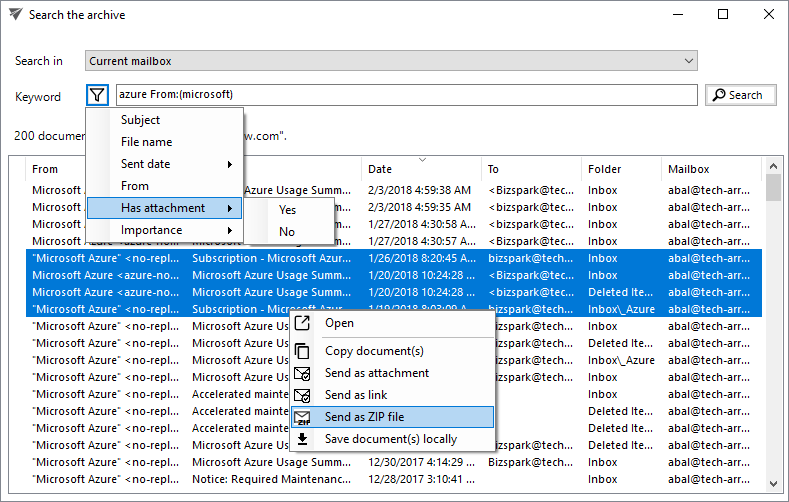
<p><strong>✓ Dedicated search for email archive:</strong> As part of the email archive integration, we have added a dedicated email archive search feature to officeGATE. This search function is directly accessible from the Outlook ribbon when the user has a configured contentACCESS email archive. The new search UI allows end users to search the primary mailbox as well as other accessible mailboxes. It provides quick search by entering a keyword, as well as property-based search by specifying one or more properties and values. Users are also assisted by helper functions to simplify property searches. The new search dialog supports all officeGATE functions, such as saving and forwarding items.</p>
<p><img decoding="async" loading="lazy" src="https://docs.tech-arrow.com/assets/images/EA_Search-1a6b255d11c4d7e49328ea1aeebba537.png" width="789" height="502" class="img_ev3q"></p>]]></content>
        <author>
            <name>Attila Balázsy</name>
        </author>
        <category label="officeGATE" term="officeGATE"/>
        <category label="Release" term="Release"/>
    </entry>
    <entry>
        <title type="html"><![CDATA[officeGATE Version 2.8]]></title>
        <id>https://docs.tech-arrow.com/release/officegate/officegate-2-8</id>
        <link href="https://docs.tech-arrow.com/release/officegate/officegate-2-8"/>
        <updated>2016-11-15T00:00:00.000Z</updated>
        <summary type="html"><![CDATA[✨ Highlights]]></summary>
        <content type="html"><![CDATA[<h2 class="anchor anchorTargetStickyNavbar_Vzrq" id="-highlights">✨ Highlights<a href="https://docs.tech-arrow.com/release/officegate/officegate-2-8#-highlights" class="hash-link" aria-label="Direct link to ✨ Highlights" title="Direct link to ✨ Highlights" translate="no">​</a></h2>
<ul>
<li class="">Introduces offline synchronization, enabling access to files and folders without a network connection and faster document opening through local storage.</li>
<li class="">Adds single sign-on support for both OneDrive Business and OneDrive Personal, requiring credentials to be entered only once.</li>
<li class="">Improves OneDrive functionality with enhanced search and full read/write support, including folder creation, uploads, renaming, and deletion.</li>
<li class="">Enhances overall user experience with faster item listing, pre-connection configuration checks, resolved refresh issues, and improved error handling and logging.</li>
</ul>
<h2 class="anchor anchorTargetStickyNavbar_Vzrq" id="features">Features<a href="https://docs.tech-arrow.com/release/officegate/officegate-2-8#features" class="hash-link" aria-label="Direct link to Features" title="Direct link to Features" translate="no">​</a></h2>
<ul>
<li class=""><span class="release-badge" style="background-color:#1a73e8;color:#fff;border-radius:6px;padding:2px 8px;font-size:0.7rem;font-weight:600;margin-right:0.5rem;vertical-align:middle">NEW</span> Offline synchronization. This feature was created for users who often work without a connection to their essential company IT systems. The new offline synchronization enables access to files and folders even without a network connection. Files can be periodically downloaded to a read-only local document storage. This also speeds up document opening, as when a document is up to date in the local storage, it is opened locally by default. Of course, it can be opened online as well.</li>
<li class=""><span class="release-badge" style="background-color:#1a73e8;color:#fff;border-radius:6px;padding:2px 8px;font-size:0.7rem;font-weight:600;margin-right:0.5rem;vertical-align:middle">NEW</span> Single sign-on for OneDrive. The user has to enter credentials only once for both OneDrive Business and Personal.</li>
<li class=""><span class="release-badge" style="background-color:#188038;color:#fff;border-radius:6px;padding:2px 8px;font-size:0.7rem;font-weight:600;margin-right:0.5rem;vertical-align:middle">IMPROVEMENT</span> Better OneDrive support. Search and full support for both read and write operations (folder creation, document upload, rename, and delete operations) were added.</li>
<li class=""><span class="release-badge" style="background-color:#188038;color:#fff;border-radius:6px;padding:2px 8px;font-size:0.7rem;font-weight:600;margin-right:0.5rem;vertical-align:middle">IMPROVEMENT</span> Improved user experience. The provider configuration is checked before connection, item listing for contentACCESS is faster, tree and list refresh issues were fixed, configuration issues were resolved, and error handling and logging were improved.</li>
</ul>]]></content>
        <author>
            <name>Attila Balázsy</name>
        </author>
        <category label="officeGATE" term="officeGATE"/>
        <category label="Release" term="Release"/>
    </entry>
    <entry>
        <title type="html"><![CDATA[officeGATE Version 2.7]]></title>
        <id>https://docs.tech-arrow.com/release/officegate/officegate-2-7</id>
        <link href="https://docs.tech-arrow.com/release/officegate/officegate-2-7"/>
        <updated>2016-05-04T00:00:00.000Z</updated>
        <summary type="html"><![CDATA[✨ Highlights]]></summary>
        <content type="html"><![CDATA[<h2 class="anchor anchorTargetStickyNavbar_Vzrq" id="-highlights">✨ Highlights<a href="https://docs.tech-arrow.com/release/officegate/officegate-2-7#-highlights" class="hash-link" aria-label="Direct link to ✨ Highlights" title="Direct link to ✨ Highlights" translate="no">​</a></h2>
<ul>
<li class="">New native connectors for OneDrive and Perceptive Workplace.</li>
<li class="">Enhanced sharing with reusable default options for faster, consistent sharing.</li>
<li class="">Clearer email notifications that explain the accessibility of shared files.</li>
<li class="">Ability to attach contentACCESS files to appointments, contacts, tasks, and meetings.</li>
<li class="">Improved search across all providers, allowing users to browse results after the first provider responds.</li>
</ul>
<h2 class="anchor anchorTargetStickyNavbar_Vzrq" id="features">Features<a href="https://docs.tech-arrow.com/release/officegate/officegate-2-7#features" class="hash-link" aria-label="Direct link to Features" title="Direct link to Features" translate="no">​</a></h2>
<ul>
<li class=""><span class="release-badge" style="background-color:#1a73e8;color:#fff;border-radius:6px;padding:2px 8px;font-size:0.7rem;font-weight:600;margin-right:0.5rem;vertical-align:middle">NEW</span> New native OneDrive connector</li>
<li class=""><span class="release-badge" style="background-color:#1a73e8;color:#fff;border-radius:6px;padding:2px 8px;font-size:0.7rem;font-weight:600;margin-right:0.5rem;vertical-align:middle">NEW</span> New Perceptive Workplace connector</li>
<li class=""><span class="release-badge" style="background-color:#188038;color:#fff;border-radius:6px;padding:2px 8px;font-size:0.7rem;font-weight:600;margin-right:0.5rem;vertical-align:middle">IMPROVEMENT</span> Improved sharing options. The user can now save sharing options as default and can set these options to use for every new share and don’t need to specify them before share. Information added to email’s body about the accessibility of the shared files. The user can now attach contentACCESS file also in these item types: Appointment, Contact, Task, Meeting</li>
<li class=""><span class="release-badge" style="background-color:#188038;color:#fff;border-radius:6px;padding:2px 8px;font-size:0.7rem;font-weight:600;margin-right:0.5rem;vertical-align:middle">IMPROVEMENT</span> If the user searches in all providers he can now browse search result after the first providers result</li>
</ul>]]></content>
        <author>
            <name>Attila Balázsy</name>
        </author>
        <category label="officeGATE" term="officeGATE"/>
        <category label="Release" term="Release"/>
    </entry>
    <entry>
        <title type="html"><![CDATA[officeGATE Version 2.6]]></title>
        <id>https://docs.tech-arrow.com/release/officegate/officegate-2-6</id>
        <link href="https://docs.tech-arrow.com/release/officegate/officegate-2-6"/>
        <updated>2016-02-24T00:00:00.000Z</updated>
        <summary type="html"><![CDATA[✨ Highlights]]></summary>
        <content type="html"><![CDATA[<h2 class="anchor anchorTargetStickyNavbar_Vzrq" id="-highlights">✨ Highlights<a href="https://docs.tech-arrow.com/release/officegate/officegate-2-6#-highlights" class="hash-link" aria-label="Direct link to ✨ Highlights" title="Direct link to ✨ Highlights" translate="no">​</a></h2>
<ul>
<li class="">Directly share files from Microsoft Outlook via contentACCESS, enabling quick collaboration with partners, customers, and colleagues.</li>
<li class="">Use the new federated search to retrieve results from all connected providers with a single query.</li>
<li class="">Deploy and configure officeGATE more easily using the new MSI installer with group policy support.</li>
<li class="">Benefit from enhanced context menu options, including opening parent directories, uploading new files, and verifying connection settings.</li>
<li class="">Enjoy improved compatibility and usability with support for Microsoft Outlook 2016 and enhanced tooltips for Favorites.</li>
</ul>
<h2 class="anchor anchorTargetStickyNavbar_Vzrq" id="features">Features<a href="https://docs.tech-arrow.com/release/officegate/officegate-2-6#features" class="hash-link" aria-label="Direct link to Features" title="Direct link to Features" translate="no">​</a></h2>
<ul>
<li class=""><span class="release-badge" style="background-color:#1a73e8;color:#fff;border-radius:6px;padding:2px 8px;font-size:0.7rem;font-weight:600;margin-right:0.5rem;vertical-align:middle">NEW</span> Share your files directly in Outlook using officeGATE. With the help of contentACCESS you can share documents with your partners, customers and colleagues with a few clicks</li>
<li class=""><span class="release-badge" style="background-color:#1a73e8;color:#fff;border-radius:6px;padding:2px 8px;font-size:0.7rem;font-weight:600;margin-right:0.5rem;vertical-align:middle">NEW</span> Federated search! This new version allows to get search results from all providers with a single query</li>
<li class=""><span class="release-badge" style="background-color:#1a73e8;color:#fff;border-radius:6px;padding:2px 8px;font-size:0.7rem;font-weight:600;margin-right:0.5rem;vertical-align:middle">NEW</span> We have a new MSI setup allowing group policy installations and automatic configuration of officeGATE. This is a great help for administrators to set up officeGATE on all user workstations in a fully automatized way</li>
<li class=""><span class="release-badge" style="background-color:#1a73e8;color:#fff;border-radius:6px;padding:2px 8px;font-size:0.7rem;font-weight:600;margin-right:0.5rem;vertical-align:middle">NEW</span> Open the parent directory of the document in the search result using the context menu</li>
<li class=""><span class="release-badge" style="background-color:#1a73e8;color:#fff;border-radius:6px;padding:2px 8px;font-size:0.7rem;font-weight:600;margin-right:0.5rem;vertical-align:middle">NEW</span> Verify your connection settings to contentACCESS and MS SharePoint</li>
<li class=""><span class="release-badge" style="background-color:#1a73e8;color:#fff;border-radius:6px;padding:2px 8px;font-size:0.7rem;font-weight:600;margin-right:0.5rem;vertical-align:middle">NEW</span> Upload a new file into the selected folder using the new option in the context menu. This works for all providers</li>
<li class=""><span class="release-badge" style="background-color:#1a73e8;color:#fff;border-radius:6px;padding:2px 8px;font-size:0.7rem;font-weight:600;margin-right:0.5rem;vertical-align:middle">NEW</span> officeGATE is optimized to work with the newest MS Outlook 2016</li>
<li class=""><span class="release-badge" style="background-color:#1a73e8;color:#fff;border-radius:6px;padding:2px 8px;font-size:0.7rem;font-weight:600;margin-right:0.5rem;vertical-align:middle">NEW</span> Tooltips for Favorites now show the parent folder to ease the navigation</li>
</ul>]]></content>
        <author>
            <name>Attila Balázsy</name>
        </author>
        <category label="officeGATE" term="officeGATE"/>
        <category label="Release" term="Release"/>
    </entry>
    <entry>
        <title type="html"><![CDATA[officeGATE Version 2.5]]></title>
        <id>https://docs.tech-arrow.com/release/officegate/officegate-2-5</id>
        <link href="https://docs.tech-arrow.com/release/officegate/officegate-2-5"/>
        <updated>2015-12-15T00:00:00.000Z</updated>
        <summary type="html"><![CDATA[✨ Highlights]]></summary>
        <content type="html"><![CDATA[<h2 class="anchor anchorTargetStickyNavbar_Vzrq" id="-highlights">✨ Highlights<a href="https://docs.tech-arrow.com/release/officegate/officegate-2-5#-highlights" class="hash-link" aria-label="Direct link to ✨ Highlights" title="Direct link to ✨ Highlights" translate="no">​</a></h2>
<ul>
<li class="">Adds a German language option configurable in Settings.</li>
<li class="">Introduces support for MS Outlook 2016 and MS SharePoint Tasks.</li>
<li class="">Expands SharePoint integration with the ability to connect to multiple sites (premium feature).</li>
<li class="">Enables uploading original emails when contentACCESS Email archive shortcuts are dropped onto an officeGATE container.</li>
</ul>
<h2 class="anchor anchorTargetStickyNavbar_Vzrq" id="features">Features<a href="https://docs.tech-arrow.com/release/officegate/officegate-2-5#features" class="hash-link" aria-label="Direct link to Features" title="Direct link to Features" translate="no">​</a></h2>
<ul>
<li class=""><span class="release-badge" style="background-color:#1a73e8;color:#fff;border-radius:6px;padding:2px 8px;font-size:0.7rem;font-weight:600;margin-right:0.5rem;vertical-align:middle">NEW</span> German version; switch the language in Settings</li>
<li class=""><span class="release-badge" style="background-color:#1a73e8;color:#fff;border-radius:6px;padding:2px 8px;font-size:0.7rem;font-weight:600;margin-right:0.5rem;vertical-align:middle">NEW</span> MS Outlook 2016 support</li>
<li class=""><span class="release-badge" style="background-color:#1a73e8;color:#fff;border-radius:6px;padding:2px 8px;font-size:0.7rem;font-weight:600;margin-right:0.5rem;vertical-align:middle">NEW</span> MS SharePoint Tasks support. Work with task attachments, create tasks, and more</li>
<li class=""><span class="release-badge" style="background-color:#1a73e8;color:#fff;border-radius:6px;padding:2px 8px;font-size:0.7rem;font-weight:600;margin-right:0.5rem;vertical-align:middle">NEW</span> Allow users to upload original emails when a contentACCESS Email archive shortcut is dropped onto an officeGATE container</li>
<li class=""><span class="release-badge" style="background-color:#1a73e8;color:#fff;border-radius:6px;padding:2px 8px;font-size:0.7rem;font-weight:600;margin-right:0.5rem;vertical-align:middle">NEW</span> Connecting multiple MS SharePoint sites (premium feature)</li>
<li class=""><span class="release-badge" style="background-color:#1a73e8;color:#fff;border-radius:6px;padding:2px 8px;font-size:0.7rem;font-weight:600;margin-right:0.5rem;vertical-align:middle">NEW</span> Less branding in the premium version (premium feature for OEM partners)</li>
<li class=""><span class="release-badge" style="background-color:#188038;color:#fff;border-radius:6px;padding:2px 8px;font-size:0.7rem;font-weight:600;margin-right:0.5rem;vertical-align:middle">IMPROVEMENT</span> Easier switching between Tree and Grid views using the middle mouse button</li>
</ul>]]></content>
        <author>
            <name>Attila Balázsy</name>
        </author>
        <category label="officeGATE" term="officeGATE"/>
        <category label="Release" term="Release"/>
    </entry>
    <entry>
        <title type="html"><![CDATA[officeGATE Version 2.4]]></title>
        <id>https://docs.tech-arrow.com/release/officegate/officegate-2-4</id>
        <link href="https://docs.tech-arrow.com/release/officegate/officegate-2-4"/>
        <updated>2015-10-11T00:00:00.000Z</updated>
        <summary type="html"><![CDATA[✨ Highlights]]></summary>
        <content type="html"><![CDATA[<h2 class="anchor anchorTargetStickyNavbar_Vzrq" id="-highlights">✨ Highlights<a href="https://docs.tech-arrow.com/release/officegate/officegate-2-4#-highlights" class="hash-link" aria-label="Direct link to ✨ Highlights" title="Direct link to ✨ Highlights" translate="no">​</a></h2>
<ul>
<li class="">Added support for Datengut DMS and Perceptive DMS.</li>
<li class="">Enabled connections to multiple third-party DMS systems.</li>
<li class="">Introduced paging in list mode.</li>
<li class="">Improved overall performance.</li>
</ul>
<h2 class="anchor anchorTargetStickyNavbar_Vzrq" id="features">Features<a href="https://docs.tech-arrow.com/release/officegate/officegate-2-4#features" class="hash-link" aria-label="Direct link to Features" title="Direct link to Features" translate="no">​</a></h2>
<ul>
<li class=""><span class="release-badge" style="background-color:#1a73e8;color:#fff;border-radius:6px;padding:2px 8px;font-size:0.7rem;font-weight:600;margin-right:0.5rem;vertical-align:middle">NEW</span> Datengut DMS support</li>
<li class=""><span class="release-badge" style="background-color:#1a73e8;color:#fff;border-radius:6px;padding:2px 8px;font-size:0.7rem;font-weight:600;margin-right:0.5rem;vertical-align:middle">NEW</span> Perceptive DMS support</li>
<li class=""><span class="release-badge" style="background-color:#1a73e8;color:#fff;border-radius:6px;padding:2px 8px;font-size:0.7rem;font-weight:600;margin-right:0.5rem;vertical-align:middle">NEW</span> Support for multiple third-party DMS system connections</li>
<li class=""><span class="release-badge" style="background-color:#1a73e8;color:#fff;border-radius:6px;padding:2px 8px;font-size:0.7rem;font-weight:600;margin-right:0.5rem;vertical-align:middle">NEW</span> Paging in list mode</li>
<li class=""><span class="release-badge" style="background-color:#188038;color:#fff;border-radius:6px;padding:2px 8px;font-size:0.7rem;font-weight:600;margin-right:0.5rem;vertical-align:middle">IMPROVEMENT</span> Increased performance</li>
</ul>]]></content>
        <author>
            <name>Attila Balázsy</name>
        </author>
        <category label="officeGATE" term="officeGATE"/>
        <category label="Release" term="Release"/>
    </entry>
</feed>